WTF is the actual point of ICloud?

It appears the last couple of Macs I purchased (a Studio and a MB Pro) had ICLoud turned on by default or I was bamboozled into using it.

It promises to just transparently backup your desktop files I guess. Sounds benign.

But I cannot for the life of me figure out where my desktop files actually are, or are not. I have been turning ICloud off so that things like the following don’t happen:

  1. I copy files daily to my Mac Studio from an Azure VM where I do most of my work. DB backups mostly. I then back them up from my Mac Studio.

  2. I then copy the same files to my MacBook Pro and back them up from there as well.

  3. Lately a lot of those files have been vanishing from my MacBook Pro. At first I thought it was Carbon Copy Cloner because they would tend to disappear right after a backup.

What it turned out to be was some sort of pruning going on with ICloud.

I also had issues with files copying from the Studio to the MB Pro very fast or very slow, like a couple orders of magnitude different, depending on some unknown whim of ICloud and/or MacOS.

GetInfo will sometimes show the path to the file on the other machine, sometimes it will show a network or Samba share, sometimes it shows a path that starts with ICloud.

I’m always doing the same thing in the UI – open a window on the Studio to (what I thought was) the local file system, open a 2nd window on the same desktop and navigate to the MacBook Pro (or what I thought was the MacBook Pro), select the files on the Studio to copy, and paste them to the Pro.

Someone explain to me like I’m a 3 year old WTF this functionality is even for, if the same UI actions produce different results on different days.

What I THOUGHT this was about was my desktop files being mirrored to ICloud so the files could in principle be shared across devices and would be somewhat backed up, but I’m still actually working with my local files. What APPEARS to be happening is that I am literally using a cloud file system INSTEAD of my local storage resources. Or at least that’s what’s happening sometimes, when the wind is blowing the right way.

Anyway I am working on disentangling myself from ICloud altogether.

Am I just failing to understand its wonderfulness?
Sorry, I don’t have an explanation for you. Just my personal preference.

Whether it’s OneDrive, DropBox or iCloud. I’ve always employed these services as a backup system rather than a live file system.

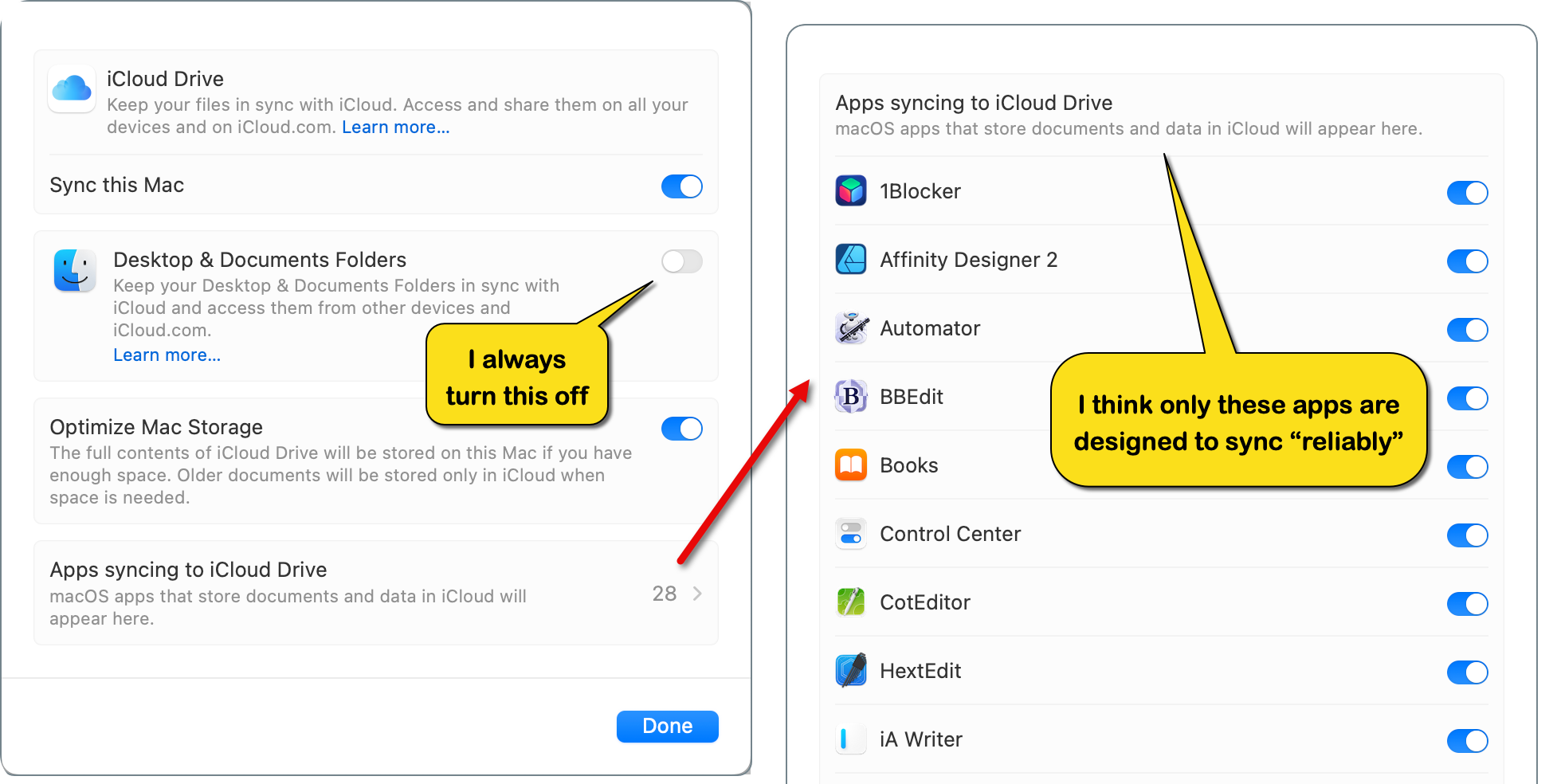
On all my Apple devices (3 Macs, 1 iPhone & 1 iPad), I turn off syncing Desktop & Document folders (because yes, these folders act weird).

For larger projects (Xcode, Xojo, JetBrains, etc.) or important Word or Excel documents I always use a non-cloud folder locally. Then:

A.) - If any of the files need to be worked on another Mac, I use GitHub Desktop and private repos to manage pushing and pulling them.

B.) - Have a backup routine that zips these non-cloud files and copies them to a designated folder in iCloud and they sit there in storage for if and when I need them. I run this routine at the end of each day.

Note: my zipped file names include today’s date, e.g., MyDevProject-2025-10-17.zip

With the above in mind, for small files and other stuff less important, like a code snippet file I can open in BBEdit or screenshots using Snagit, then I use the iCloud dedicated folder supported by the app, because I think those apps have hooks into the CloudKit framework that aids in proper synchronization (that’s just a guess, because I’m still learning Swift).

Hope that helps.

Note: of the apps supported for syncing in iCloud, Xcode is not one of them. I’m just guessing, but I think even Apple knows their syncing is not perfect.

2 Likes

Just thoughts, no judgement on your approach.

Backups and sync jobs should always be automated. Even if you’re absolutely certain you haven’t made any mistakes, everybody makes mistakes, everywhere and all the time.

I had a similar eye-opening experience on my Macs many years ago (10+). Suddenly, I realised that my keychain was synchronised in iCloud. It was a total disaster because I used different computers for isolated tasks/projects. An update simply enabled the sync without my intervention. Basicaly I broke wth that my NDAs giving a 3rd party all customer’s secrets. For me, this was not a bug or a coincidence. For many years, this had never happened with MobileMe.

That was the moment I said goodbye to Apple and have since been syncing everything with my own Nextcloud (contacts, calendar, files) using GNU/Linux Debian with Gnome instead of an Apple Mac.

1 Like

Yes, at device setup and sometimes after updates, Apple assumes that you want to sync all your stuff in iCloud. Not great, but it can be turned off/on at any time. When you turn it off, make sure to accept the option to keep a local copy on your device.

I use iCloud syncing for documents and desktop folders. It is convenient when working on files across multiple devices and for sharing with others. I have a local documents folder, too, for all files I don’t want to put on iCloud. This comprises all source code things. Putting source files in iCloud may cause trouble.

iCloud keeps a copy of a file on each device and one on the iCloud server. The server file is the pivot against which the device’s file syncs.

P.S. this is an answer to the op.

1 Like

Thanks to all who replied. It’s reassuring to know that I’m not insane, delusional or stupid, lol.

So turning off syncing of desktop folders puts me on the right track, then. And check frequently because some update or other could covertly turn that back on.

It seems like from what folks post here about the vagaries of MacOS and IOS that Apple’s operating systems are like most deities – capricious, arbitrary and unreliable. Windows of course has its own weirdnesses, but I think my general familiarity with it over the years plus that it’s much more unashamedly a file system oriented OS, means fewer surprises like this.

I have some experience with *NIX OSes as well and those are probably even less likely to surprise me in these ways, but … alas all my clients seem to be captive to Microsoft stacks and for the most part Apple hardware has been reliable so I haven’t had any major motivation to switch to, say, a Linux flavor and one of the several GUIs atop those, for my local machine. I may yet do that, though, if this kind of thing keeps interfering with things – to borrow an Apple catch phrase – Just Working.

–Bob

MacOS has its deficiencies. In my day job I work on a company-provided Windows laptop. This teaches me everyday, how good macOS is. In direct comparison, macOS issues are minor annoyances.

3 Likes

I am working inside of my company with Linux and macOS. For one Customer I have to work on Windows what makes big problems. Windows isn’t a real professional OS. But it has the biggest part in Desktop market.

I am not using Microsoft Programs at all, also MS-Office I was preventing my self from using it while using SoftMaker Office which is less complex and reliable at all. And yes, Linux has problems, macOS has problems. But small ones compared to the Microsoft World.

Using Linux and macOS Terminal is interestingly really similar as macOS is simply a BSD derivate. And it works exactly so. It is a classical UNIX OS. Linux is in many cases like a UNIX. Especially using the command line in console is the same like with macOS or BSD or also AT&T Unix 5 and it’s later derivates or Solaris OS. In my case it is simly while I was long time developing for Unix. Before Linux and before macOS-X which was the first Unix based System od Apple.

Apple made a good choice with this architecture while it is really portable like heck and can be ported to nearly every Hardware architecture with the needed capabilities and environment.

Coming to the iCloud: the Part I am not using at all. I have my own Cloud infrastructure builded on Synology systems. Even for private use I have two synology 2 bay systems to have my data stored always redundant on two systems.

How ever: I am not a fan of this product cause it drives mad and is not working as I would expect it.

1 Like

Dull and old architecture, not the best choice for desktop that was their true focus at the time. Server side they already had used IBM AIX for ANS.

BeOS would have been much more interesting choice to build on.

Beos was never an alternative. Small ecosystem and really closed architecture. There are reasons why beis is dead. Bsd was the best unix way. When apple decided to build osx on top of bad they opened their world for multiple architectures.

But really bad choice for a desktop operating system.

Well my experience in Windows is colored by the fact I haven’t used it as a desktop OS since Windows 7 and all my development happens on Windows Server without all the “AI” and other cruft. My only requirement is that it has my files where it says they are and stays out of my way, is reasonably performant, etc.

I would have said that a few releases of MacOS ago but I am starting to get the sense that Apple doesn’t give a fig about the user experience anymore than MSFT ever did. And I think MSFT has more concern about breaking changes / backward compatibility, though we can debate the strengths and weaknesses of that I suppose.

Main annoyance in Windows (or at least Windows Server) is little things that they haven’t bothered to fix since forever, although they are so little I can’t think of an example right at the moment. I have a Windows 11 VM on my Mac Studio but it is seldom running so don’t have much experience about that.

1 Like

Be was interesting
Just unproven & therefore riskier
As far as I recall

Apple has made a pretty decent Unix based OS with a graphical UI

Perhaps you want to expand on that and tell us why you believe that to be the case?

And it didn’t have printing or networking implemented, one of those, I forgot which one, at the moment Apple had to make decision.

BEOS was not crashing while so many people used it. It was crashing cause they had too less revenue with their product. If millions would buy it…but that was not the case. We can not behave like it was the one and only good in tht time. It had nice parts. Also it had bad parts. And as much bugs as Xojo. So no need for that OS. it’s mice to remember. But it’s history since many years. Snd by the way: the Ideas are 24 years old. There was a big amount of developments until today. I guess that is forgotten?

Luckily Haiku OS is progressing nicely. I like the clean UI without unnecessary eye candy.

Looks like the UI of Windows ME or Windows 95. Odd and old. From the day before yesterday. Would not be something I can use to sell Software

I’ll stick to Adwaita Dark :wink: