Objo Studio v26.6.2 Released

Objo Studio 26.6.2 is now available. It adds some genuinely useful new building blocks for app development, improves performance in an important part of the desktop UI toolkit, and gives developers more control over how their interfaces are drawn.

Calendar control

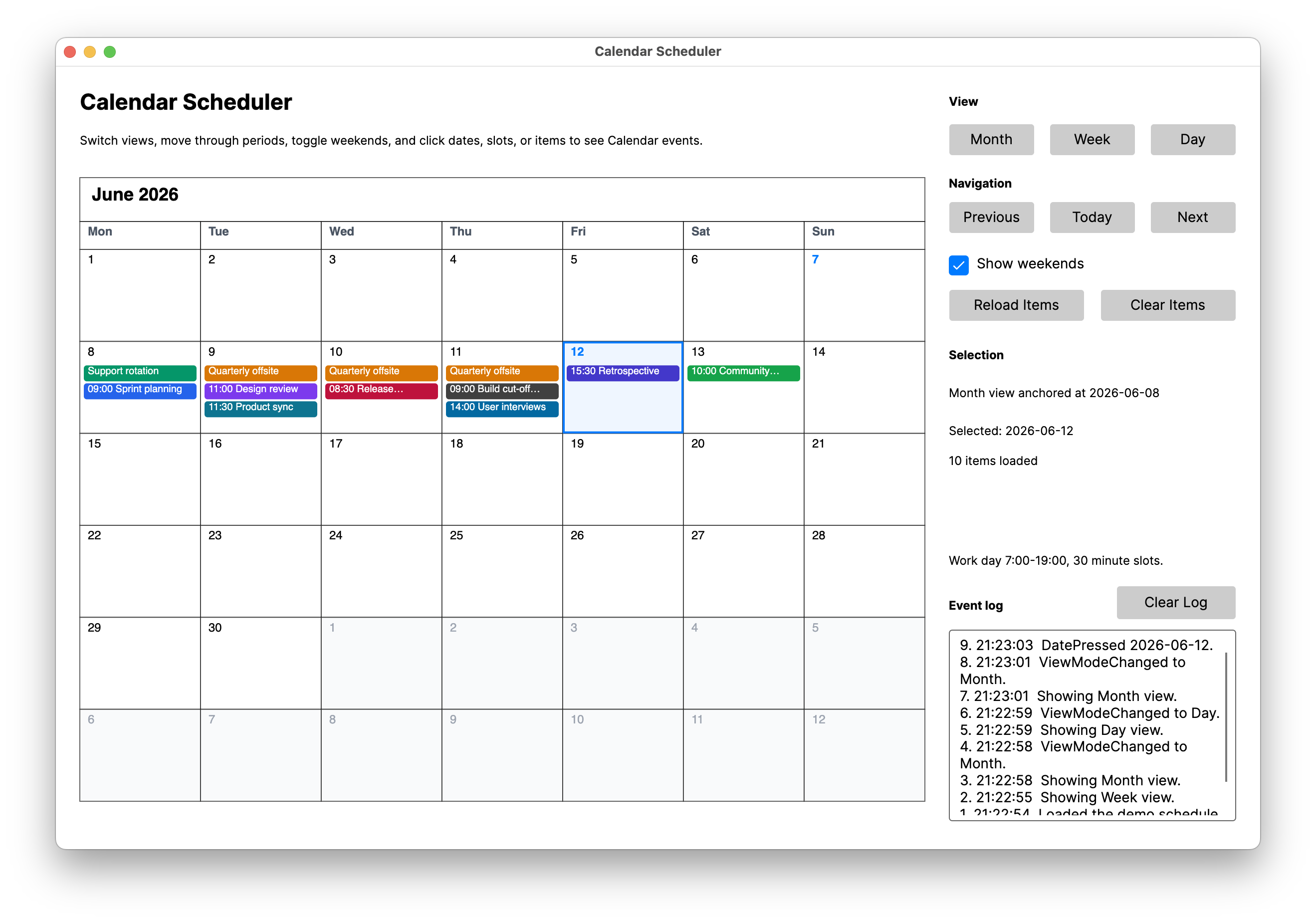
This release adds a new Calendar control, making it much easier to build apps that need date selection or date-focused interfaces.

Instead of piecing together date handling manually, you can now drop in a purpose-built control and let Objo Studio handle the common interaction details for you. This is another step towards making ObjoBasic feel productive for everyday desktop app development.
New HashSet type

ObjoBasic also gains a new HashSet type.

HashSet is useful whenever you need to store unique values and quickly check whether something already exists. It is a good fit for filtering duplicates, tracking visited items, managing selections, and other cases where membership matters more than ordering.

More flexible ListBox drawing

ListBox now has new event handlers for custom drawing.

This gives developers more control over how list content is rendered, opening the door to richer rows, custom visuals, and more specialised interfaces without having to abandon the standard ListBox control.

Faster Canvas drawing

I’ve also made significant improvements to the Canvas drawing performance.

Canvas is one of the most important controls for custom interfaces, visualisations, games, and drawing-heavy tools, so improving its speed has a direct impact on the kinds of apps people can build comfortably in Objo Studio.

You can download Objo Studio 26.6.2 from the usual download page and read the full changelog too.
Congratulations Gary!

You are moving at pace…

Was wondering…is there a HTML Viewer UI component or alternate pathway to render html, pdf etc?

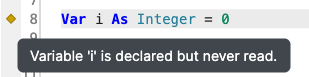
Some of the little touches in the IDE are great, like highlighting unused variables:

Screenshot 2026-06-08 at 9.00.24 am

Kind regards,

Andrew

Thanks for the kind words. I’m trying really hard to add/support little touches that make the environment pleasant to use without becoming too bloated.

As for the HTMLViewer, I’ve just added that to the roadmap: Feature #369 - Objo

Thank you Gary!

For how many years my Ticket for a cross-platform Date/Time-Picker in Xojo was open? 7 or 8 years? You brought them on Day 1 and now you push a calendar control - it’s so awesome!

Good job Garry!

Thanks mate!

I have to be hungrier than Xojo because I need to build a strong following in a tough market. If someone asks for something that seems reasonable and a good fir for Objo, I’ll add it as soon as I possibly can!

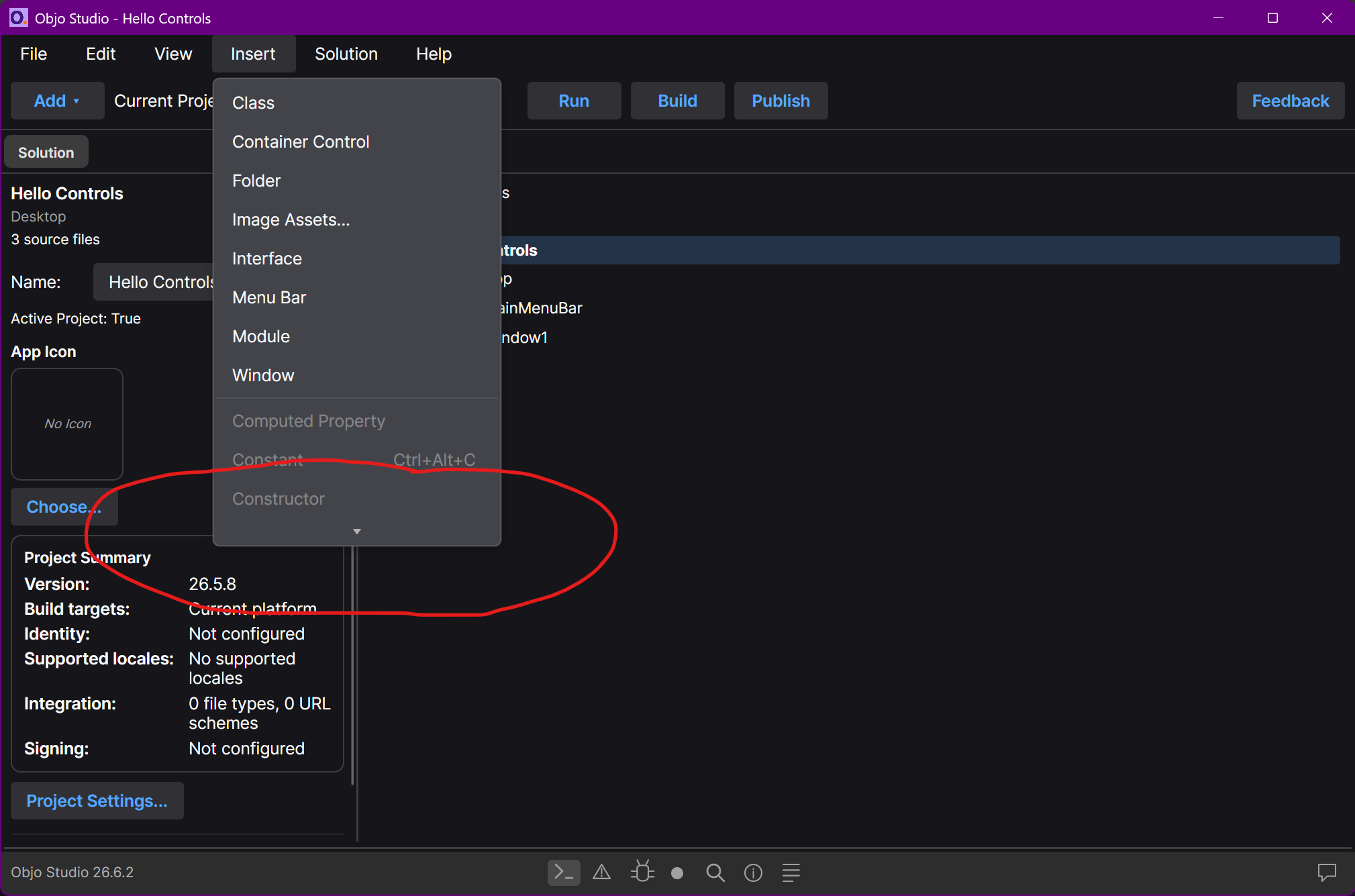
Hi Garry, on Windows i see the program menus shortened - on a big screen. I have to scroll thru then.

Thanks for spotting this, Tomas.

You were right: this was not intentional. Objo Studio uses Semi.Avalonia for menu styling, and Semi’s default menu flyout height was capped at 400 DIP. The Insert menu has grown beyond that, so on Windows it could show scroll buttons even on a large display with plenty of room.

I’ve fixed this properly in Studio’s theme override layer so the Insert menu and the toolbar Add menu can show fully on normal desktop displays, while still allowing menus to scroll on genuinely small screens. I’ve also added a regression test so this should not quietly come back as the menu grows.

This is fixed for the next release: Bug #398 - Objo

It’s best to report bugs on Objo’s forum (https://forum.objo.dev) if possible as I will spot it faster and fix it quicker :slight_smile:

Hello Garry,

Excellent work!

I have a feeling the CEO of Xojo is occasionally waking up in the middle of the night wondering what feature Objo Studio will add next. :grinning_face_with_smiling_eyes:

nightmare!!!

I truly doubt that

I’d bet he doesn’t see the train coming

Doesn’t see, or doesn’t care … it amounts to the same thing.

and even if he would see or care… what options he has left?

Objo shows in so many dimensions and in a brutal way, how incompetence looks like.

Our genuis missed the point many years ago. Even if he would Open Source everything today, the Community with able devs and power users might be too small to change something, not sure if the code would be useful anyway, with the bow wave full of bugs in front of the ship.

Yeah I think the fundamental problem now is lots of technical debt and bad architecture; a clean slate like Objo is the only way.

I’m also impressed from Objo Studio so far.
But there is an issue in Avalonia UI on macOS, that i was not aware of. If you use the modern metal Rendering-Mode, then the GUI will stretch and jitter while resizing a window, see here.
Only way so far is to use deprecated OpenGL Mode or Software Rendering mode. Which mode does Objo Studio use?
I really hope Avalonia can figure this out. Google Chrome also uses Skia and does not show this behaviour on macOS.

Thanks Tomas. Objo Studio does not currently force Avalonia’s Metal renderer.

The shipping build is still on Avalonia 11.3.x and uses the normal UsePlatformDetect() startup path. On macOS, Avalonia Native’s default rendering order there is OpenGL first, with software rendering as the fallback. So at the moment Objo Studio is deliberately on the conservative path, not opting into Metal.

I’ve seen the macOS resize/jitter reports around Avalonia 12 and I’m keeping an eye on them. I won’t move Studio to a renderer or Avalonia version that makes the IDE feel worse during normal use. If Metal becomes solid on macOS, I’ll reassess, but smooth and predictable behaviour wins for now.

If you do see this jitter in Objo Studio itself, please let me know your macOS version.

The big problem is: the curtain was now falling. ObJo shows how a development of a multiplatform language, framework and IDE can be done. That’s one thing we should not forget. It is not so that the developers are not good. It is the point that the product itself has a structure which makes maintenance really heavy. And yes it would not be a problem to work on it. But that’s something the big chief needs to want also. Big changes are needed in XoJo at the end.

There was one decision for Kotlin for Android use. They could have used this way for a complete cross platform environment. That would make several things different but on the other side it would be a system which leaves many problems behind. They decided not to do something like that. That’s it

Exactly. I have no special insight into the competence or talent of those devs and so make no assumptions on that score at all. But even the most talented devs would be hampered by bad architectural decisions / technical debt and bad leadership. At this point in my view Xojo is one giant sunk cost fallacy and I suspect that being on that team is quite the slog whether anyone will publicly admit to it or not.

Awesome new version, but the underlying Avalonia 12 does exhibit the described issue now, it stretches and jitters on quick resizing of the window.