i don’t own an Apple Silicon Mac, only an MacBook Pro 2018 16 GB (x64 Intel). I understand the Objo dev that he don’t support Mac Intel as Dev Host anymore.
So I tried to get in touch with Objo Studio Windows - installed under Parallels Win10 on my Intel Macbook. I was surprised how fast the Studio startet and also to work with it in the VM Machine on MacBook Pro.
Tested the demo of physics2d-box Objo Demo and it loads very fast , compiled in only a few seconds and also run fast - including very fast startup of the he debugger.
I think doing the same with XOJO (running win version under Parallels on an older MacBook Pro 16GB) would be an nightmare of slowness.
I plan to buy an M1,M2 Mac - used of course - next year. Until than, could I use Objo Studio under Parallels Win10 running on Intel MacBook Pro.
Question: If I would buy an Objo License - to also build apps , not only run them , can the Objo Studio Windows Version (running under Parallels on Intel MacBook Pro) build x64 Mac apps? I can see that in the build options ARM Mac and X64 Mac is selectable.
Sure, maybe the build must bei code signed by hand for adhoc (running local) but that would be OK for me. I don’t want to use Apple Store - only local hobbies usage of the app.
Yup, I am doing the same on my old Macbook Pro 15" from 2017, the touch bar one for testing purposes. Under same Parallels there I also have Ubuntu running. ARM copy of Ubuntu runs within UTM and Windows 11 ARM in VMWare Fusion on my main computer, M2 Max Macbook Pro 16".
But i run them rarely, I am doing the same thing now while developing in Objo Studio what I’ve been doing for several years now in 4D: I do all development on my main computer, M2 Mac, both Objo Studio and 4D are so good that you really do not need another computer or virtual machine to develop on another platform, let’s say I am 99% confident what I develop on macOS will work on Windows and, in Objo case, on Linux too. I fire Windows virtual machine only to check interface elements for 4D apps I work on, for Objo I almost never do that since it uses Avalonia so by definition it should look the same on all three platforms.
You can build, but not publish.
For building and publishing I use GitHub action I wrote which allows me to build on all three platforms without having to install, maintain and update Windows or Linux. You can find it here, it is public repository, so anybody can use it:
Check these two repositories to see how to use it from your projects:
Yes, you can definitely build for macOS from Windows Objo Studio. However, you cannot cryptographically sign an app for macOS from Windows. You need macOS for that. That is an Apple restriction. So you could ad hoc sign to run a macOS on a device you own but in order to bypass Apple’s Gatekeeper on a different Mac you need to build on macOS.
Practical takeaway: a Windows user can build, test-in-a-folder, and hand-deliver an unsigned .app, but it will trip Gatekeeper on other people’s Macs. A distributable macOS release needs a Mac at the end of the pipeline - either the same project opened in Studio on a Mac (which signs, notarises, and produces the DMG) or an external pipeline that performs the Apple signing.
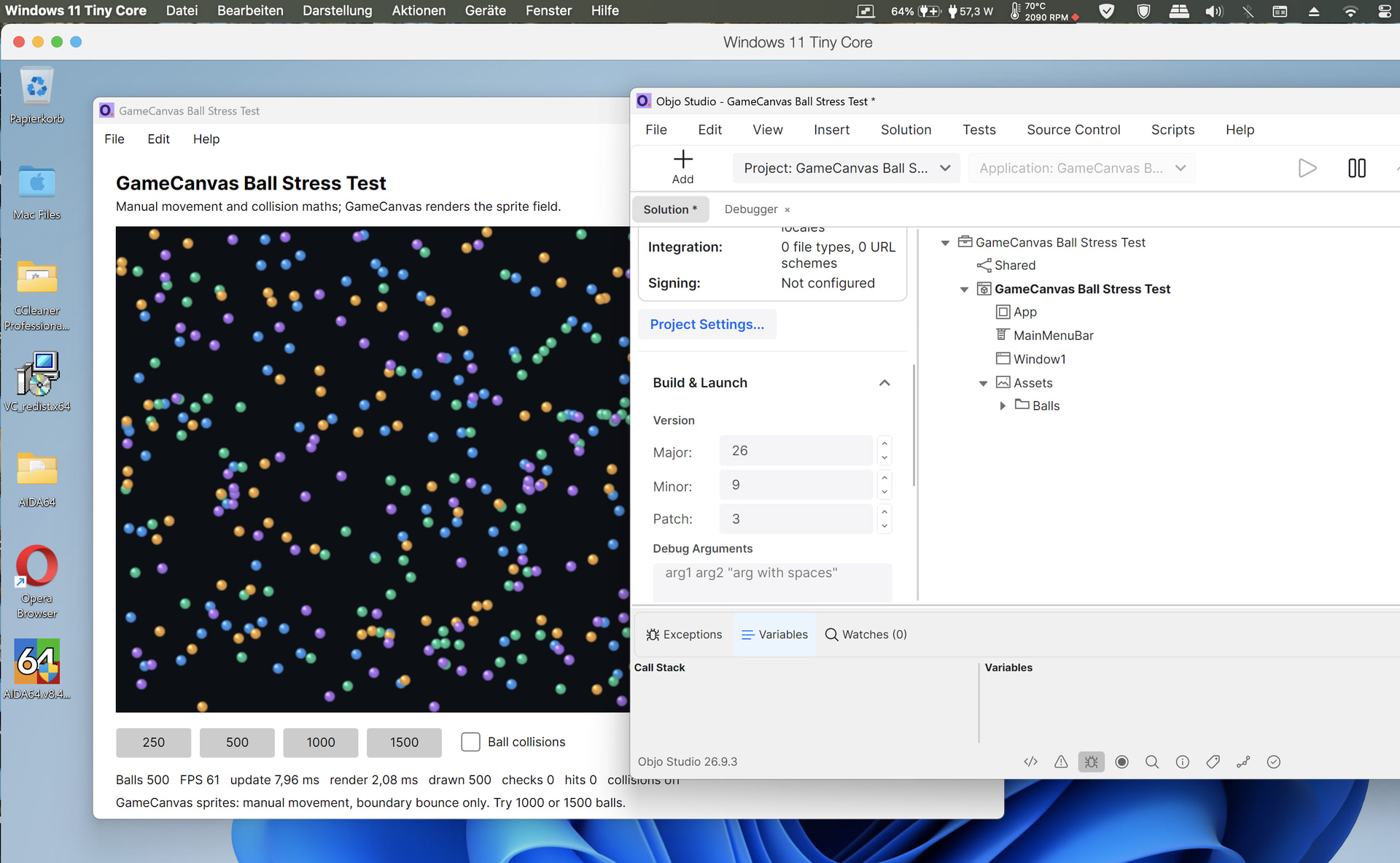
After some time again amazing how fast the IDE and also the example Stress Balls runs (in run mode, no license ) side by side on my MacBook Pro 16 GB Intel. And that not native, runs in the VM Windows 11 with Parallels (8 GB) under Mac OS.
No lag in the Ball simulator up to 61 FPS with 500 Balls there.
I think I will buy the lic before Oct 2026 when price goes up - even I don’t have already an Apple Silicon Mac to use Objo there native without the workaround under VM windows.
Yeah I’m testing out some ideas that I half expected would be asking too much in terms of performance, but so far it doesn’t seem to be breaking a sweat. I think it’s a combination of modern hardware, the highly optimized .NET runtime under the hood, and very good architectural instincts on Garry’s part.
The .NET part is not to be underestimated. Each November when there’s a new release, a massive post goes up detailing every new optimization in seemingly every corner of the runtime, and it goes on for countless pages, including receipts (benchmarks and attendant code for those who want to reproduce the results for themselves).
I did a deep dive about 3 years ago studying the garbage collector, I recall, and since then a ton of work has been done, including optimizing away much of the former “stop the world” default collection algorithm.
It’s true that some of these optimizations are corner cases that don’t apply to some classes of apps at all, but it all adds up. Microsoft can be ham-fisted and tone deaf corporate posterior orifices sometimes, but they are not holding back on fine tuning the .NET engine and that is something we all benefit from. That most of it is open source is paying dividends too; the code gets a lot of scrutiny and proposals and contributions.
That said, Objo is running Garry’s custom VM and allocation management, so he deserves huge credit for the excellent performance of native Objo code, too. Where .NET helps out is things like efficient collections (e.g. Objo’s Array(Of T) is really a .NET List, Objo leverages .NET’s string backing store, etc)
@Andreas_Stuttgart, thank you for trying this and sharing the results. Seeing 500 balls running at around 61 FPS inside a Windows VM on your Intel Mac is lovely. I’m especially chuffed to hear that Studio and the debugger feel quick there too.
@bgrommes, that’s very kind of you. Objo benefits enormously from the work that goes into .NET, and it means a lot to hear that the Objo side is holding up well in what you’re building. Performance is absolutely crucial to me. I have to work extra hard because once people hear that Objo is a VM they immediately think it will be slow which is just simply not true at all on modern hardware.
Please keep telling me how you get on, including if you find anything that does feel slow. Feedback from both of you is hugely appreciated.
Yes, I like how fast Qbjo starts and runs - even in the Win VM (I don’t have Apple Silicon Mac, only Intel Mac).
Today in the XOJO Forum:
Currently on Windows 11.
I have a large project that benefits from aggressive compiler optimization, it has been compiling for over 12 hours now. That part is fine, I can wait for it.
However, this keeps Xojo tied up and I’m not able to work on or debug other applications in other Xojo windows at the same time. My other Xojo IDE windows technically respond, but they are incredibly slow. Like, click on something and wait 20 seconds for the click to register. And I’m not able to debug them, clicking the “Run” button has no effect, probably because the compiler is already in use.
Is there any workaround? I would love to be able to lower the process priority of the compile and keep working. I have 128 GB of RAM and plenty of CPU overhead so the system can definitely handle it.
12h ? OMG - even if its a biiiiiig project and “optimised” XOJO compilation
I will try my 2024 XOJO also under Win VM - I am sure startup (with no plugins ) will take much longer..
There is one thing I never understood. Why they did changed their API that often. I was always happy that at the Java site I had more silence. At the end I believe that Garry choosed the right way. Cause of his Idea he could realize it and it works. I know exactly what kind of work it means to implement a language compiler. As Anthony also knows. And that if definitely a big amount of work. And not to forget: Garry is not a programmer. He did not studied computer sciences, physics, mathematics as the most programmers have. Chapeau. Good job. And at htis point his decision for an own VM shows: it was definitely the right one.
I haven’t found changes to be breaking changes, more thrashing around in terms of direction. For example, Microsoft never met a remote procedure call API that they could commit to for any length of time. I went all-in on .NET Remoting years ago for one client, and then MSFT decided it was “old and lousy” as opposed to “new and improved” and went with something else. Still, .NET Remoting still works, it is just “deprecated”. So far as I know that code is still running all these years later. The only practical problem is having to throw out an experience base and refactor for some different approach if I want to “keep up” and not incur technical debt. And by now everyone is tired of me carping about what they did to FoxPro (embrace and extend = engulf and devour, lol).
Probably the biggest example of this kind of thing at the moment is their inability to settle on a cross platform strategy. Oh they have stated one, but … look at it closely, and it’s still a hot mess and they are relying on 3rd party projects to plug gaps in some cases.
Sometimes I think they suffer from having “more money than sense” – they don’t mind investing in three different approaches and may the best one win. The problem is that sometimes ALL of them lose. Or developers read the tea leaves wrong and commit to one of the losers. MSFT is very unsentimental that way; in fairness to them, what they did to FoxPro, they did to their own signature one-time hit and cash cow, VB6. They know how to file for divorce and move on without regret. Good for them – I guess. The unfortunate side effect is that they don’t value developer loyalty or community.
It is not so much developer loyalty as a version of the old saying that was circulating when I was young – “no one ever got fired for recommending IBM”. I have worked for Microsoft shops and that is just their basic requirement that I have and maintain that knowledge base. It’s the price of admission.
The market for products like Objo have a different dynamic – when you are hired as a consultant to solve a problem for a (usually) smaller company that doesn’t put any particular requirements on it, you get to pick the tool and they get to be happy, hopefully, with the result. And then once you have some client success stories to share, you can tap into the somewhat larger market of companies that have minor resistance to something they’re unfamiliar with and just want some reassurance that it has worked for other similar use cases. And of course if you have an actual working cross platform ecosystem you are selling right into where Microsoft is vulnerable, because their claims are more marketing than technical.
I See this problems every day. We have our product in use for many customers. They enjoy it cause former vb programmers are happy while getting back this in the java world without knowledge of one line of java code. Makes things simple for them. And I guess the same you have with OnJo for the customers. Hope we all have fun in the market!
The Xojo thread is telling. When someone comes up with a deficiency that is rooted in Xojo’s basic architecture, well-meaning folks come up with a plethora of workarounds. The Xojo company remains mostly inactive in such a case. With Objo, devs get a fix very soon, no workarounds. This makes such a difference.
The Xojo threading. Not one special thread somewhere else: their threading implementation which is ridiculous. And which is something GP said people will shoot in their knees with it. It had none for a long time.
So for me, the only direct experience i had was xojos cooperative threads and workers. Their preemptive stuff came after i left, and i did attempt to use it in a project that had been using workers before, thinking it should be an easy lift. That experience was my first indication that they’d spent too little time in the Architecture phase.
In Buoy, i spent a lot of time working on the threading model before any code was written, just to make sure that developers would have what they needed to be successful… including specific docs and examples showing you how to do threads correctly, and not shoot yourself in the foot.
Xojo’s problem is (and has always been) that they’re trying to dumb down complex topics that don’t simply get easier by simplifying the API surface. Take iOS constraints for example. When the Xojo implementation was done, they changed the named breakpoints and just omitted hugging, compression and intrinsic sizes from the API. The problem is that the underlying system still enforced those things and their simplified API couldn’t account for that. The user experience sucks at runtime because of that. Not to mention all of the layout jumping crap when arranging controls.
 ) will take much longer..