As always, I’m super excited to announce the immediate availability of a new Objo Studio release, version 26.7.5. I’ve fixed all known bugs (68) and added a ton of new features.
Some of which I’d like to focus on here. You can read about all changes in the changelog.
AI Assistant Improvements
Objo Studio 26.7.5 brings the largest set of improvements yet to the built-in AI Assistant.
The visible changes include persistent conversations, better web research and a more polished chat interface. Under the surface, the assistant has also been extensively reworked to make long-running tasks, tool use and code editing more reliable across every supported AI provider.
AI Conversations now persist properly
You can now maintain multiple AI conversations for each solution. Studio restores your most recently used conversation when you reopen a solution, and conversations can be created, renamed, archived, restored or deleted.
Deleted conversations are moved to a local trash area, where they can be recovered or permanently removed later.
Conversations are now stored as user-local Studio data rather than inside the project itself. This keeps AI transcripts out of shared .objo and .objosln files while still allowing them to follow normal operations such as Save As.
Each conversation can focus on the whole solution or a particular project. The project selector has also been simplified and only appears when it is useful.
Switching to a different AI provider or model is handled more safely too. Studio can create a new conversational branch containing the visible discussion, without passing incompatible provider-specific state to the new model.
Longer conversations with controlled memory
Long conversations no longer have to become increasingly unwieldy or abruptly lose useful context.
Studio now understands each model’s available context window and can manage the information sent with each request. You can leave this on “Automatic”, supply a known context size or configure a smaller working target to control the cost and latency of local models.
When an older conversation becomes too large, Studio offers three explicit choices:
- Compact the earlier conversation and continue.
- Continue using only the most recent turns.
- Cancel the message.
If you choose compaction, the model produces a concise summary for your review. You can edit that summary before accepting it, inspect it again later or undo it entirely. The original conversation remains visible and intact.
Long tool-driven tasks can also compact their temporary working state automatically. This allows the assistant to continue working without repeatedly sending every source listing, tool result and intermediate step back to the model.
The old fixed ten-round tool loop has been replaced with more useful safeguards based on context, cumulative usage, repeated no-progress activity and provider calls. Productive tasks therefore have much more room to finish, while runaway requests are still bounded and can always be stopped.
Safer and more capable code editing
AI code changes now travel through the same Studio automation layer used by the IDE itself. This gives them consistent validation, revision checking, undo support, dirty-state handling, editor refresh and recompilation.
This substantially reduces the risk of an assistant:
- Applying an edit to a file that has changed since it was read.
- Continuing with later changes after an earlier write may have failed.
- Creating a source file in the wrong project, folder or module.
- Editing a different solution after the user has switched projects.
- Repeatedly retrying the same unsuccessful operation.
The assistant can now inspect several related source types in a single operation, add several members to one type atomically and move an existing source file into a module—including moves between projects and shared code.
Source creation has also been improved. The assistant can copy the exact placement of a related source file or specify the project, folder and parent module explicitly. It is instructed to establish the correct location before creating anything rather than guessing or working around mistakes with duplicate files.
Code editing remains disabled by default. The chat panel now displays a clear read-only notice when editing is unavailable, and write tools are not offered to the model unless permission has been enabled.
Better knowledge of Objo
The assistant has a new authoritative language-query tool for questions about Objo syntax, keywords and language behaviour. Unlike a broad documentation search, it can return explicit negative evidence when a proposed keyword or construct is not part of the language.
Documentation search results now distinguish strong matches from partial suggestions, and long documentation sections can be read in bounded pages. Together with improved type inspection and example lookup, this makes the assistant less likely to improvise syntax based on another language.
Responses containing Objo code are now validated before being accepted. Studio checks code-fence language tags, Objo comment syntax and claims that a block is an exact excerpt from the current project. If a response fails validation, the model receives one focused opportunity to repair it. Ordinary prose can still stream immediately while fenced code is briefly held for checking.
The validation snapshot is refreshed after successful edits, so the assistant can accurately refer to code it created earlier in the same response.
Much better web searching
Web search is no longer limited to Kagi. Objo Studio 26.7.5 adds support for:
- Brave Search
- Tavily
- Exa
- An experimental, keyless Exa option (i.e. free!)
Search and page fetching are separate tools, so the assistant can search for a topic and then inspect the most relevant result in detail. When web access is enabled, these tools remain available throughout the request instead of depending on whether Studio happens to recognise a search-related phrase.
Fetched pages are reduced to their main content and converted into compact Markdown. Results are size-limited and clearly marked as untrusted evidence so that instructions embedded in a webpage are not treated as instructions from the user.
Page fetching also includes stronger protections against unsafe redirects, private or local network addresses, oversized responses, unsupported content and other potentially unsafe destinations.
More consistent provider behaviour
The assistant continues to support Ollama, LM Studio, OpenAI, OpenAI-compatible services, Anthropic and Gemini. In 26.7.5, those integrations have been brought under a shared conformance contract and extensively tested with synthetic provider streams.
Among other things, this improves:
- Multi-step tool continuations.
- Multiple tool calls in one response.
- Provider-specific thinking and continuation state.
- Tool-call argument assembly.
- Usage reporting.
- Finish reasons, errors and incomplete responses.
- Behaviour when a provider becomes unresponsive.
Provider silence now has a configurable inactivity timeout, set independently for each provider. This measures inactivity rather than total response duration, so a long response can continue for as long as it remains active. Individual tools also have their own safe timeout behaviour.
Malformed batches of tool calls are rejected before any tool runs. Tool failures, cancellations, timeouts, permission denials and missing targets are now represented as distinct structured outcomes, giving both the model and the user a much clearer explanation of what happened.
A more polished chat experience
The chat panel has received a broad visual and usability pass.
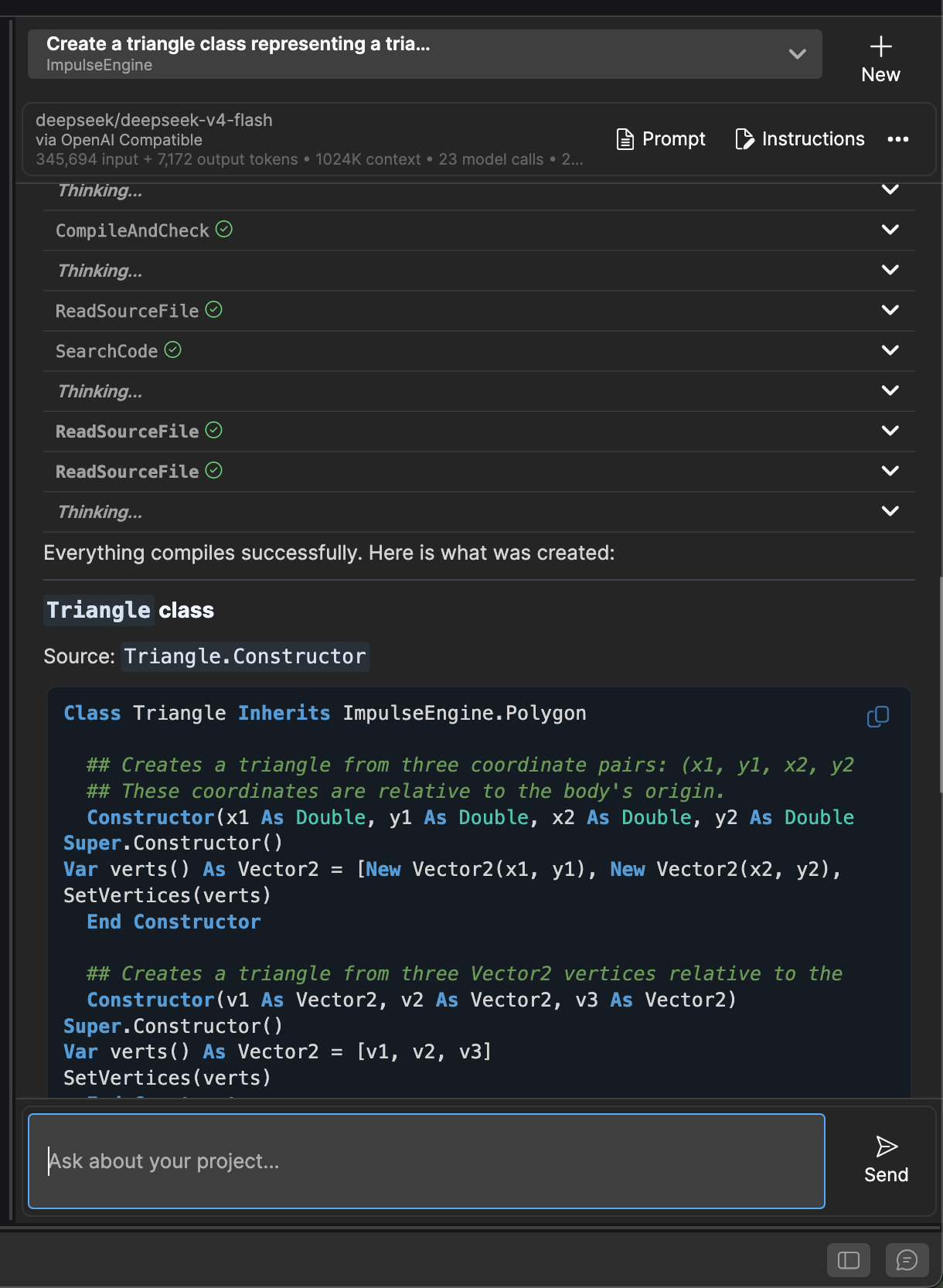
Text, thinking blocks and tool activity now appear in the order in which they occurred. Tool calls show clear success or failure icons and can be expanded to inspect their parameters, status and result.
Other improvements include:
- Copy buttons on individual code blocks.
- More compact Markdown headings and lists.
- Improved code-block rendering and spacing.
- A larger, more comfortable message composer.
- Better automatic scrolling that pauses when you scroll back to read.
- An option to expand thinking blocks by default.
- Better handling of text selection.
- Clearer response metadata and wrapping.
- Correctly aggregated token usage across multi-step responses.
- Additional metrics including model calls, peak input, cached and reasoning tokens, generation speed and provider-reported cost in US dollars.
There is also a new diagnostic export for difficult conversations. It records provider rounds, context decisions, tool activity, validation results and the final outcome. Because an exported diagnostic can contain prompts, project code and model reasoning, Studio explicitly reminds you to review it before sharing.
Laying the Foundation for IDE Automation
Some of the most important work in Objo Studio 26.7.5 is not yet visible in the UI.
This release introduces the first substantial foundation for automating Studio with Objo code. The long-term goal is for Studio commands, the AI Assistant and future Objo scripts and extensions to use the same carefully defined IDE operations rather than each reaching directly into Studio’s internal models.
At the centre of this work is a new typed automation service. Its initial operations cover:
- Inspecting the current solution and active project.
- Reading documents and editor context.
- Applying batches of text edits or replacing a document.
- Creating, moving and renaming source files.
- Reading diagnostics and compiling a project.
- Returning immutable snapshots of Studio state.
Successful edits pass through Studio’s normal editing machinery. A logical operation is applied atomically, creates one meaningful undo step, marks the document as changed, refreshes open editors and triggers the usual recompilation and diagnostic updates.
The built-in AI Assistant is the first substantial consumer of this new layer. Its project reads and source changes now use the automation service. This is responsible for many of the safer AI editing behaviours described above.
Objo Studio 26.7.5 does not yet expose a public Run Script command or general extension system. This release is the foundational stage: stable identities, conflict-safe edits, typed operations, versioned contracts and a restricted runtime model.
It’s a substantial investment in what comes next - allowing developers to automate repetitive IDE tasks and eventually create Objo-authored Studio extensions, while preserving undo, reliability and clear security boundaries.
Other significant improvements
This release isn’t only about the AI Assistant. There’s plenty of lovely new features and improvements for those who aren’t interested in LLM-assisted coding within the IDE.
Downloads in HTMLViewer
HTMLViewer can now handle browser-initiated downloads on Windows, macOS and Linux.
Applications can prompt the user for a destination, save automatically to the Downloads folder or block downloads entirely. New events expose the complete download lifecycle, including the initial request, progress and final result. Downloads can be redirected to a particular file, cancelled by the application and inspected for structured errors such as access denial, a full disk or a network interruption.
A new bundled example demonstrates all three download policies and the associated events.
First-class enumerations
Enumerations can now be added directly to a project, folder or shared code as top-level source items. They appear alongside classes, modules and interfaces in the Navigator and open in Studio’s enumeration editor.
This makes small shared types easier to organise and removes the need to place every enumeration inside another source file.
Faster database applications
Database record processing has received a significant performance pass. In our 250,000-row benchmark, common RecordSet iteration scenarios ran approximately 18–60% faster, while several cases also allocated substantially less memory.
The precise improvement will depend on the query and the number of columns accessed, but applications that process large result sets should see a meaningful benefit.
Safer conversion from text
Integer, Double, Currency and DateTime now provide TryParse methods, with locale-aware overloads where appropriate.
These APIs return False for invalid input instead of raising an exception, making them particularly convenient for forms, imported data and configuration files.
Better keyboards for a global audience
Keyboard handling now distinguishes between the symbol typed by the user and the physical key that was pressed. This is especially important on AZERTY, QWERTZ and other non-US keyboard layouts.
The new KeySymbol, PhysicalKey and IsPhysicalKeyDown() APIs make it possible to build both text-oriented shortcuts and position-oriented game controls correctly.