Importantly, we fixed all known bugs (24) as part of our committment to ensuring Objo Studio is a high quality, much loved tool.
In addition, 26.6.3 adds a whopping 25 new features! Admittedly, some are bigger than others and I’d like to call out a few of my favourites:
New Zip module
Zip is a built-in module for creating, extracting, and inspecting .zip archives in a really easy, Objo-like way:
Var source As FileSystemItem = SpecialFolder.Documents.Child("Export")
Var archive As FileSystemItem = SpecialFolder.Desktop.Child("Export.zip")

Zip.Create(source, archive)
TimeZone support
TimeZone represents a timezone such as UTC, Europe/London, or America/New_York. It is immutable and backed by the host platform’s timezone database.
Customise inspector behaviour for UI control subclasses
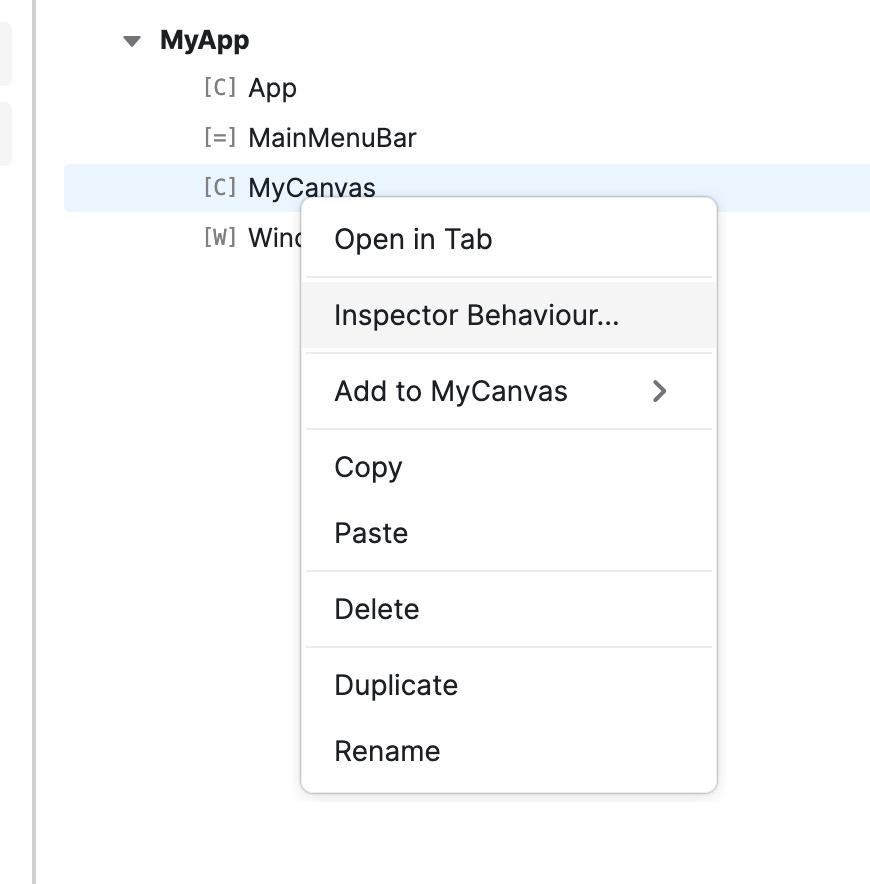
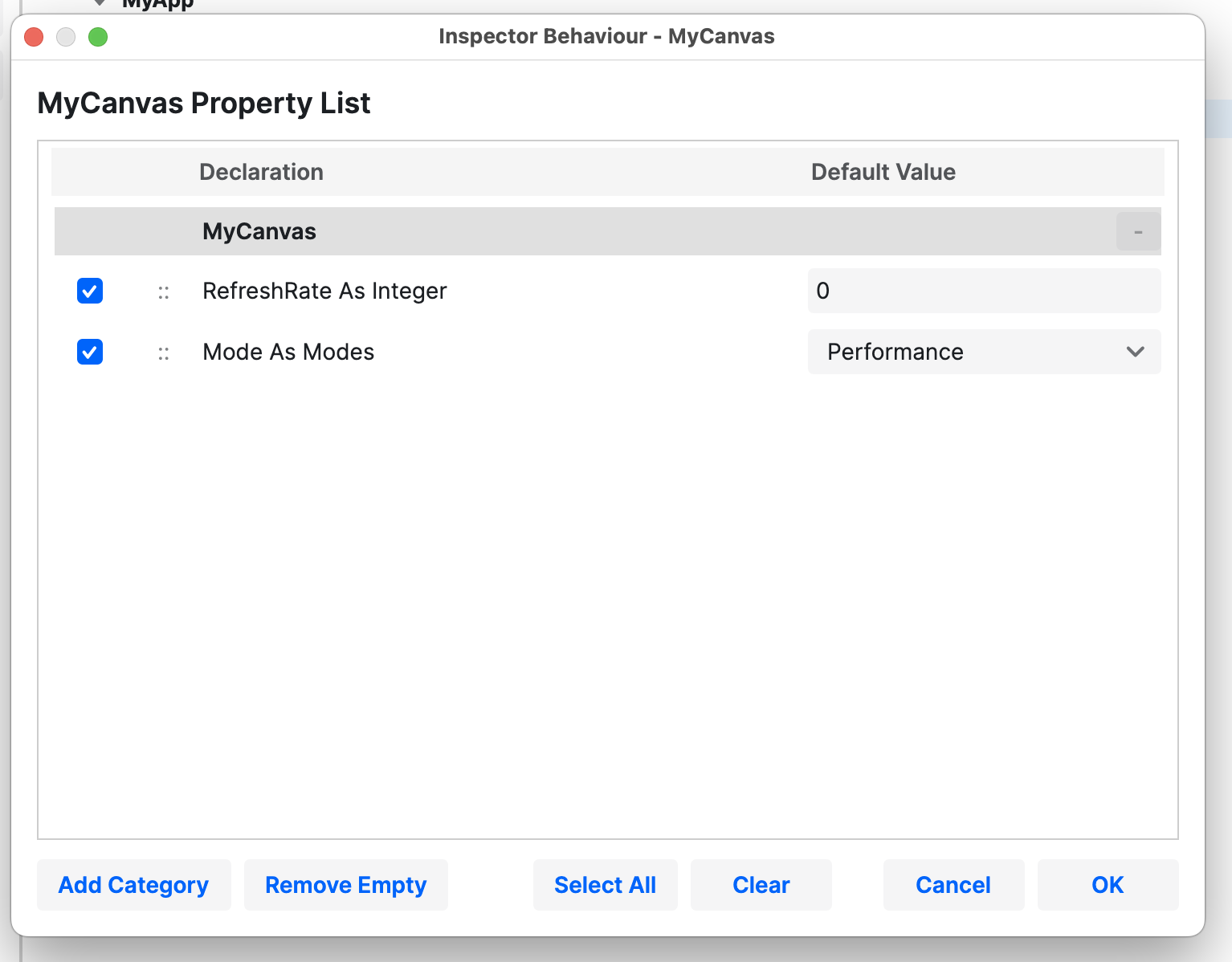
This is a nice feature. If you subclass a UI control (e.g. the Canvas) and have a bunch of properties you would like exposed in the inspector sidebar in the visual designer, Objo Studio now lets you do this with an intuitive interface:
As one of the members here which is since decades in this industry: write it. While you are not a heartless Software vendor. You are a former XoJo user, was by self really … cause of the fact that you started this project not as a commercial Idea but an Idea to have a replacement for XoJo that makes no headaches, is maintainable and has future. I - and I guess nobody else - never would have expected you to take on this project. Not in a million years. Not because I didn’t think you were capable of it, but because I know just how much work goes into it. Passion and dedication are just as essential as a great deal of hard work. Keep it up.
I love the new Database Interface.With this you’re on par with Xojo Connection Object and I can transfer my former Xojo Classes to Objo with less pain.
the exit chance…take it like it is API3 and rewrite and change the language. That’s what I meant
And no, I am not kidding, they will reach the point where API3 is the new big thing they are speaking about and playing with. It makes the newest stuffs needed and nobody can stand on old versions. Needed for the company to generate revenue. Cause of the high price nobody wants to pay. They have to.
And by the way: I am still happy not to rely on XoJo.
That’s what I meant. This risk is much lower with the solution whcih ObJo provides for all paltform desktop. It is a basic language with a really XoJo similar syntax. That would make sense.
Thank you for your great work on Objo Studio. It is really impressive what you accomplished. I have a question regarding creating epub archives with Objo.
I’m looking at the new ZIP features in Objo Studio and was wondering whether they could be used to create valid EPUB files.
One EPUB requirement is that the file named mimetype, containing only application/epub+zip, must be the first entry in the ZIP archive and must be stored without compression.
Does the current ZIP API allow control over:
The order in which files are added to the archive?
Whether a specific file is stored uncompressed while the remaining files are compressed?
If so, would creating a standards-compliant EPUB be possible using only the built-in ZIP features?
Garry will have to respond definitively but I suspect he’s using System.IO.Compression to implement zip file manipulation and that does allow you to specify CompressionLevel.NoCompression for a particular entry … he would just have to expose that to ObjoBasic if he hasn’t already.
Thanks for asking this. You were right that the original Zip.Create API was too high-level for EPUB creation because it created an archive from a folder in one operation.
I’ve now added a new lower-level ZipWriter API for the next release (Feature #439 - Objo). This lets you add entries explicitly, in order, and choose compression per entry. So the EPUB mimetype case should now be possible:
Var writer As New ZipWriter(outputFile, options)

Var mimetypeOptions As New ZipEntryOptions
mimetypeOptions.Compression = ZipCompression.NoCompression

writer.AddBytes("mimetype", _
    MemoryBlock.FromText("application/epub+zip", TextEncoding.ASCII), _
    mimetypeOptions)

Var folderOptions As New ZipFolderOptions
folderOptions.ExcludedPaths = ["mimetype"]

writer.AddFolderContents(bookFolder, "", folderOptions)
writer.Close()
So, the current v26.6.3 ZIP API does not support this, but the next release should. It’s still a generic ZIP API rather than an EPUB-specific module, but it was designed to support this sort of standards-compliant container format.
Thank you both, Bgrommes and Garry, for your replies. They are truly appreciated.
Garry, I don’t know what to say. I asked a question about EPUB creation and, within hours, you had already designed a solution for the next release. That level of dedication, responsiveness, and customer care is rare.
By the end of next week, I intend to buy a licence. It is my sincere wish and hope that Objo Studio will flourish and succeed. What you have accomplished so far is remarkable, and it is inspiring to see how quickly Objo Studio continues to grow and improve.
It is an honour to be among the early users of your creation and to witness its journey.
Thank you for your hard work, your passion, and your excellent customer care.