Introducing Objo Studio

Several years ago, Norm, Eugene and I talked seriously about building a competitor to Xojo. I even came up with a name for it - Objo. Ultimately we decided against it and moved on with our lives.

However, the idea never left me. I’ve watched Xojo Inc made repeated bad decisions and stop listening to community feedback. This left users (myself included) with a poor product and I reached a point a couple of years ago where I decided to do something about it.

I’ve spent the last couple of years building Objo Studio. It’s a full featured cross-platform IDE for building desktop apps and command line tools. Studio is an IDE for my own BASIC-like language called ObjoBasic. The entire pipeline is written in C#. It requires no dependencies other than the Objo Studio app.

Some features of ObjoBasic:

  • Statically typed
  • Fast, runs on an optimised VM. Within touching distance of Python regarding speed
  • Async/await support but in a beginner-friendly syntax
  • Unified object model
  • Rich standard library
  • String interpolation
  • Introspection
  • Generics support

Some features of the IDE

  • Runs on macOS, Windows and Linux (which is a first class citizen)
  • Supports local and remote debugging
  • Can publish (including signing and notarisation) direct from the IDE, ready to deploy with no dependencies
  • (optional) built in AI-assistant that has full access to your project and documentation
  • Full project analyser
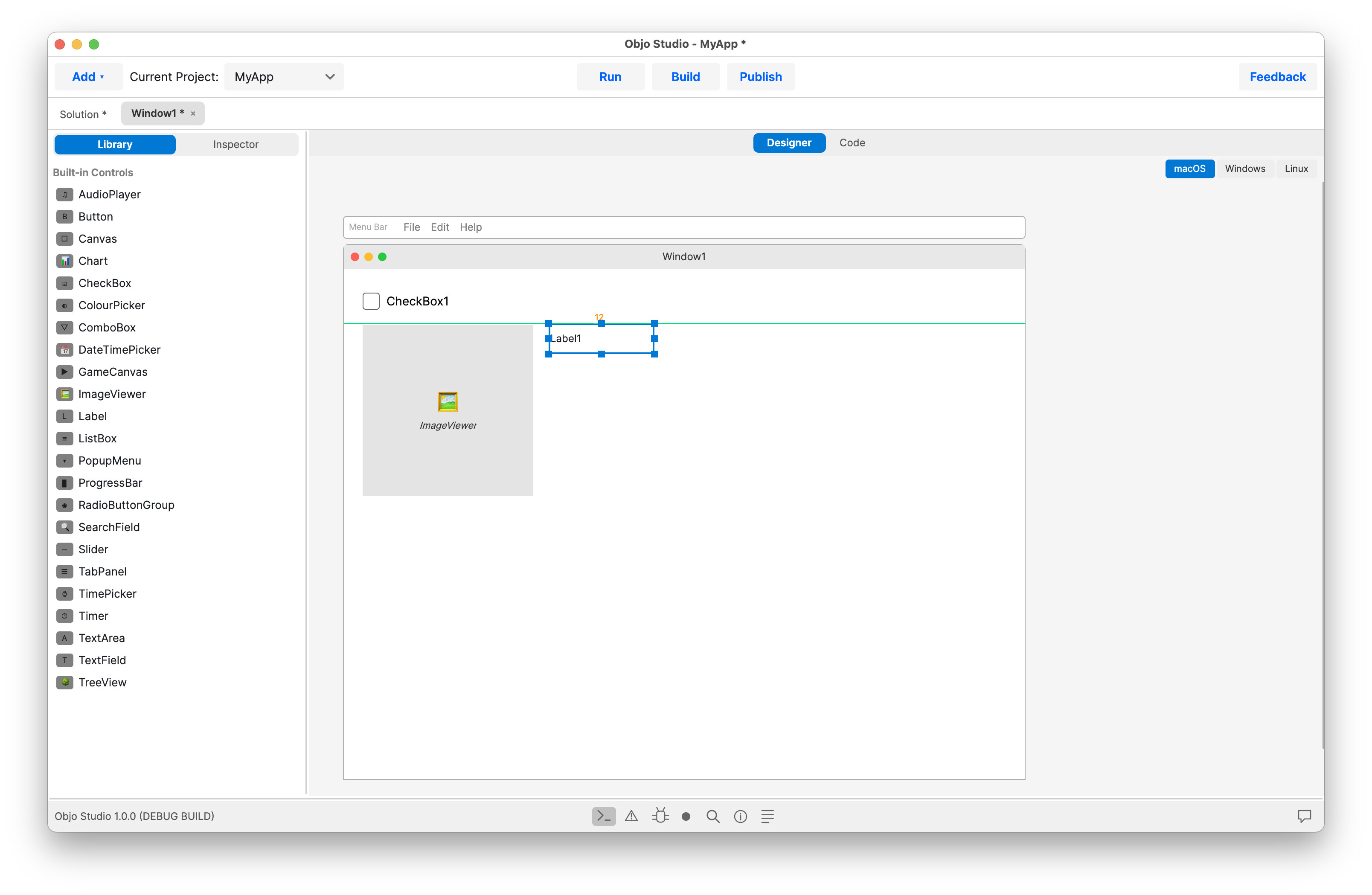
  • Visual designer for UI controls
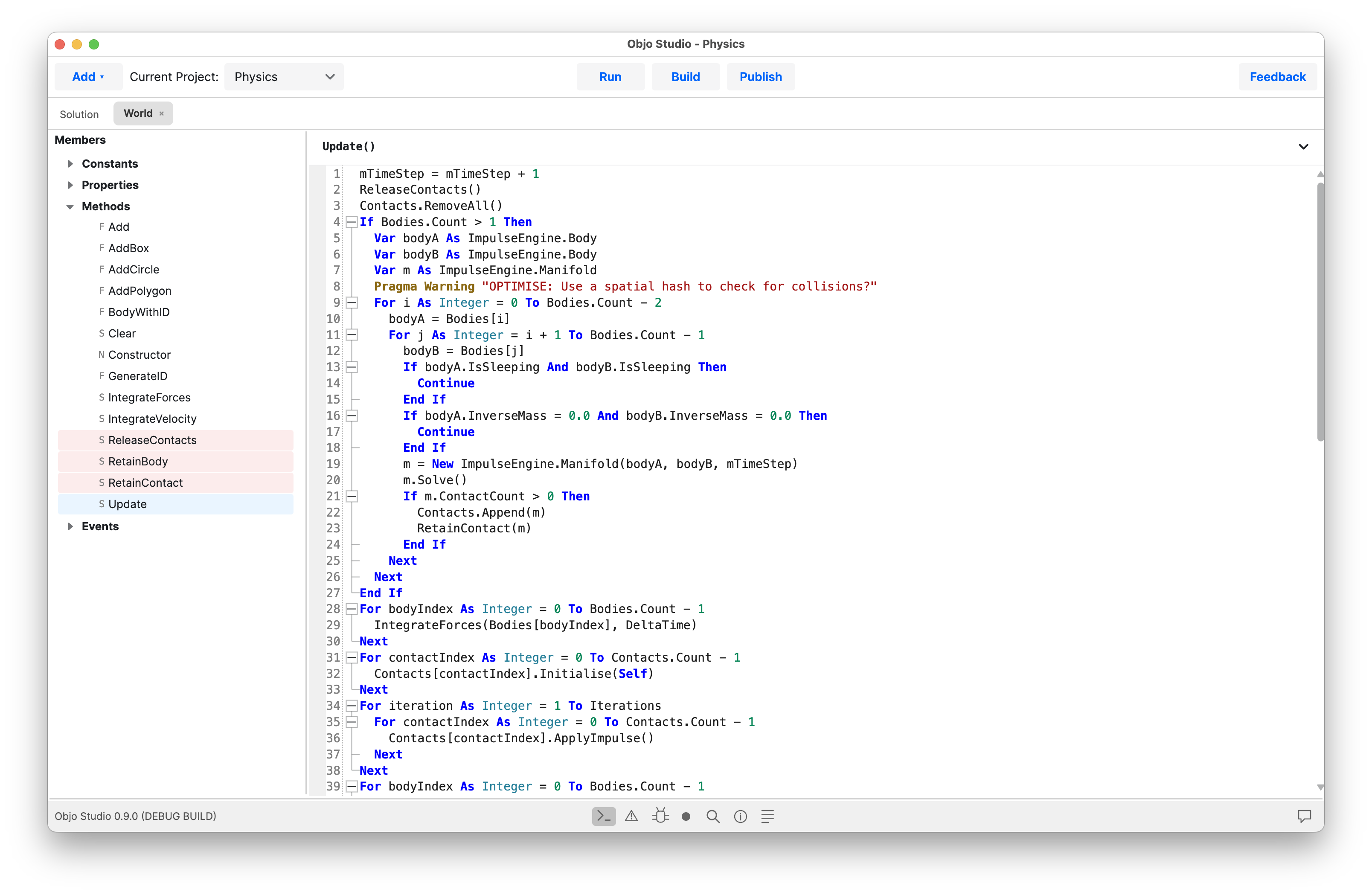
  • Comprehensive code editor with autocomplete

Screenshots

I’ve spent a lot of time on documentation and I’ve spun up a forum to build a community and to track feature requests and bugs.

Objo Studio is free to download and you can use it as long as you like whilst debugging locally. It requires a license to publish apps. I’ve deliberately priced it low as this is a new tool and I want it to be accessible to as many people as possible.

Objo Studio will always be free for schools and young people (please contact me for an educational license).

I’d really value any feedback you might have. Be kind - this has been a lot of hard work.

You always did great work, Garry. Thank you for your dedication.

It’s been several years since I played with C#, but it used to be that a compiled app required the .NET framework to be installed on the end-user’s machine for the final app to run.

Has that changed?

Or does an Objo app compile to a self-contained executable? And if so, is it a native executable?

For example, what would be required to distribute an Objo app to macOS?

My question is not meant as criticism, I genuinely want to know. I’ve been learning Swift the past year and for the most part I’m getting to where I want to go, but I don’t necessarily “enjoy” it as much I used to with Xojo (before it got too buggy and then priced me out as a customer).

It’s nice building iPhone and iPad apps with Swift, but my real focus is still macOS apps so I find your news encouraging :nerd_face:

Hi Andy,

Yes, that has changed quite a bit since the old .NET Framework days.

Objo Studio’s goal is that end users do not need to install .NET separately. When you publish an Objo app, Studio packages the app with the required .NET runtime, the Objo VM/runtime, the Avalonia desktop runtime, your compiled Objo bytecode, and your resources.

So from the user’s point of view it is a self-contained app.

The one nuance is “native executable”. Today, Objo does not compile ObjoBasic directly to native machine code like Swift or C++. ObjoBasic is compiled to Objo bytecode, and that bytecode runs inside the Objo runtime/VM hosted by a platform-specific .NET executable. On macOS, that still means a normal .app bundle containing a Mach-O executable and the native/runtime libraries it needs. It just is not NativeAOT in the strict compiler-theory sense.

For macOS distribution, the intended flow is:

  1. Build/publish a macOS app bundle, e.g. MyApp.app.
  2. Include the bundled runtime and compiled Objo app inside that bundle.
  3. For public distribution outside the App Store, sign it with an Apple Developer ID.
  4. Notarise it with Apple and staple the notarisation ticket.
  5. Put it in a drag-install .dmg.

The person downloading the app should just open the DMG, drag the app to Applications, and run it. They should not need to install .NET, the Objo Studio IDE, or anything from the Objo source tree.

So the short answer is: self-contained, yes. Native in the “normal macOS app bundle with a platform executable” sense, yes. Native in the “ObjoBasic becomes direct machine code with no VM/runtime” sense, not currently. That kind of NativeAOT path is a possible later optimisation, not the V1 deployment model.

In essence, you write ObjoBasic code in the IDE, click Run to debug, Publish to wrap it up in a DMG/sign/notarise, etc to deploy.

Windows apps can be published by Objo Studio in MSIX format (single click install/uninstall) and Linux as an AppImage.

Downloaded, and built a quick “Hello, world”, and . . . . . It’s alive! :exploding_head:

OMG, I’m impressed! Well done, Garry!

Thank you for your comprehensive answer. I like it. I like it. I like it.

I’m going to dig into this more, but for now I need to head out. Just . . . wow

Thanks for the kind words mate. It’s a labour of love.

Chapeau, Garry!

This is excellent work! The language looks fresh and modern, documentation is well written and presented.

Do I understand this correctly that all UI elements of an app can be controlled by code?

Yep, completely. :slight_smile:

all I can say is WOW.

But pllaying with buttons I noticed something… Buttons do not respond to mouseup or mousedown events. If that’s by design, should not show those as possible events.

But this is probably the wrong thread/place to discuss things like that. :smiley:

If you could file a bug on the forums I’ll track that.

100% there will be bugs but, unlike Xojo, I plan to fix them ASAP.

To be honest, I just got to the point today where I said “I need to ship this”. It was never going to be perfect on day one but I will keep improving it, you have my word.

Oh, no worries. Wasn’t expecting it to be perfect right away. Its impressive you made it this far. With a little more seasoning, this can definitely give Xojo a run for its money, not that Xojo has a lot of money to take. LOL

Keep up the good work!

Hi,

Nice projet, i post in Objo forum for some minors bugs

Thank you :slight_smile:

I’m figuring out bug tracking software in the backend at the moment so will process your forum post into some concrete tickets and get to work on them.

If you use Git or something like that can you expose the issue tracking without exposing the entire repo ?

Or use Mantis ?

Yeah the main repo is in GitHub. I think I can use Issues and link to a private repo but it’s a little fiddly.

I’ll probably go with a self hosted solution. Using a forum for bug reports can work (Kagi do it with Flarum) but it probably requires the users to take care when filing a bug - not sure that can be relied on! :squinting_face_with_tongue:

I’m in the process of setting up Gitea on an old trash can Mac Pro. That’ll handle the issues which I’ll create from forum posts/feedback and will then webhook out to a little tracker page that will show the status of the issue.

That way, users only need a forum account (or send me a message some other way) and don’t need a separate tracker account. Plus I control the whole stack. And get to use the trash can Mac, which is cool :smiling_face_with_sunglasses:

totally off topic but flare is still a thing ?

either way just thinking of options

I had a trash can Mac Pro for a long time. I don’t care what people say… I thought it was really cool.

Incredible work Garry. I wish you the best of luck with this venture.

Have you considered a mechanism for 3rd Party add-ons?

Xojo lost a lot of respect with the remaining 3rd Party vendors when they started Sherlocking them, and everyone (3rd Party add-on vendor) is looking for a way out.