How important is native GUI?

Sometimes people writing about the importance of native GUI. In case of Filechoosers and other system functionalities I can understand that. In other cases not really. How important it is really to have native GUI? Or is it more important to have native GUI behavior for FileChoosers and similar functionalities like Print dialogs? Is native Gui for you the main argument for XoJo? For which platforms are you programming?

I want this informations to get how important and why it is so important to have native GUI.

It depends, of course.

If your interest is making games, such as what I’m doing at the moment with Swift & SpriteKit, then native GUI doesn’t really enter into the equation because the UI is all graphics.

If you building a business app, then the UI needs to be intuitive and well designed. That can be achieved easily with a native GUI, otherwise you need a serious graphic designer (or expensive framework like Qt).

I guess the same could be said for consumer apps, it either has to be a native GUI or a well designed intuitive UI.

If your goal is to have a single cross-platform development tool, then admittedly Xojo is somewhat a competitor, because out of all the other cross-platform tools out there, like Java, React, Electron, Kotlin MP or B4x, Xojo is the only one that I know of that somewhat delivers (80% ??) a native experience on all platforms.

Edited to add: https://www.embarcadero.com is also an option for a native cross-platform too, but it is more expensive than Xojo and their IDE is Windows only.

But, even though that is a strength on Xojo’s side, they are still loosing the race. Cross-platform tools like Java and Electron are way more popular - and completely unconcerned with native GUI.

That goodness I gave up on the dream of cross-platform a long time ago, and finally abandoned Xojo for Swift & Xcode. I can go fully native GUI or something custom, because surprisingly, SpriteKit can also be utilized for a custom graphical UI for a business app, without a lot of effort.

1 Like

I suppose an important advantage native GUI apps have over other types, is the size of the built app.

Native apps tend to be small executables, whereas non-native can be huge.

I was so happy to finally get ride of all my installs of JetBrains and Xojo. The gigs I freed up were astounding.

The only non-native app I run on my Mac is GitHub Desktop (Electron), because it is a reliable (and free) git-client.

2 Likes

For desktop apps, having a native GUI is pretty important. For web apps, not so much.

I agree with Andy — when it comes to website graphics software, whether the GUI is native doesn’t matter as much as what’s under the hood. Native GUI does matter on Desktop Apps. Using native APIs like Vulkan or DirectX on Windows or Linux gives way more control to fine-tune performance and cut down on lag. That kind of thing really matters for 3D, VR, or other graphics-heavy projects on the cutting edge.

Even though Xojo is cross-platform, most of my work is on Windows and Linux. For anything performance-heavy — like real-time radar or medical scanning — I stick with C or C++ because they’re faster and more stable. Xojo’s great for quickly getting a prototype together, but I wouldn’t trust it for a mission-critical final product.

That said, I do like using Xojo/Python early on for experimenting or building rough drafts. It’s handy for testing ideas and flow, and I can easily drop in C/C++ code using plugins or Declares. Once things are working how I want, it’s pretty straightforward to move the project over to pure C/C++ for a more solid build.

Another big reason to go native is consistency. Native GUIs just look and feel right — Windows 10 apps look like Windows 10, and Windows 11 apps look like Windows 11. Everything behaves the way users expect.

Native GUIs mean faster performance, better responsiveness, lower latency, and a more consistent experience across operating systems. If programs don’t need speed or don’t have latency requirements, then many other programming languages (Java, Python, etc) are great. The only negative about using native GUI is that the faster refresh rates and low latency tends-to push the hardware, meaning heat and dissipation can become a concern.

I don’t have any clients using Mac, so I can’t really comment on that side of things

Edit: Changed wording and clarification for web apps and Desktop apps.

1 Like

I think native GUI is overrated. I personally don’t care if that button I’m clicking on is native or not. I do however, care that certain native behaviors remain the same like shortcut keys for cut, copy, paste, etc…

Many devs live in a tiny bubble of “how things should be“ but in the real world users dont even know what “native“ is. Looks different? Its because it is a different app who cares.

This days, “native GUI“ software is not that common. Maybe if you only do CRUD apps it is ok but specialized software rarely use “native“ componets, it is easier and faster to make your own or use a framework than adapting native ones.

Yes, some devs and other IT guys. But the answer to How important is native GUI is another question, Are those devs your target audience?

1 Like

No my target audience is interested in functionality and not natiuve GUI. But that has nothing to do with the question, I wanted to know for how many people native GUI is important and which arguments they have for natuve gui.

Some accesibility features of an OS do only work with native GUI. macOS and iOS is very good in this regard…

4 Likes

Okay, some GUI features are working only with native GUZI, for sure. But others are working without any problem. Most native API stuffs you can reach with C# or also C++ / Java. The GUI features by self are only features of the GUI and are definitely only for native GUI. Yes.

1 Like

Please respect others opinions. There are legit reasons to prefer native GUI, already explained above, and it’s not because it doesn’t matter to you that you should treat us as “living in a tiny bubble”. That’s just irrespecutful.

2 Likes

there are firms that specify native ui, but if you are not developing for those firms, please, don’t stick with native ui. ios’s flat paradigm is largely ugly and makes every screen look like a 1990’s web page. material design is interesting, but looks like everywhere you turn, it was just trying to not be ios. windoze is dreadful (but, even in windows there are elements to copy - for example, windows was the first os that used asymmetric radio buttons/sliders, which are much, much clearer than the original ones).

even at firms that demand “native”, my experience is that rule is the first one to be tossed. make your apps compelling, and then let the zealots come for you. “Howabout, ‘No’,” has gotten me through more design reviews, because, in the end, the zealot loses to all the users saying “Oooh, shiny!”

i disagree with @andyb, that you need an expensive designer to achieve that goal. if you can’t or don’t want to do it yourself, then, sure, you probably need someone who can. are they really that expensive? maybe i picked the wrong career. good design isn’t cheap. GREAT design is only slightly more difficult than good design. a long time ago, i realized that it takes me, all told, between the design, fiddling, coding, re-fiddling, prototyping, perfecting, theming, yadda/yadda/yadda an average of about eight hours per screen. i can confidently price every app, accordingly. every screen, no matter how simple or complex, will average eight hours, when it doesn’t suck any more. the compliments i receive upon delivery confirm that it’s time well-spent (and, let’s be honest, it’s the hardest, most intense, most fulfilling and the most fun part of building any app).

i tend to briefly review platform design guidelines, and revisions for all platforms (because there are good ideas and terrible ideas in every one), then steal good ideas from apps/designers/physical objects that i come across, mix in some screwing around, and then invent my own thing.

the result is that no two apps i have ever built (and, i’ve built a lot) look alike. they’re all different. they do not go out the door if they aren’t gorgeous, because they hurt my eyes if they aren’t. they all end up being different because the users have different needs, different color palettes, and as time goes on, i stumble upon objects in the real world, and app designs/elements/controls that i think deserve to be copied, and then also terrible elements that need to be discarded and avoided at all costs. many design elements make it from one project to another. some even live through several projects over multiple years.

native is easy. you can settle for easy. easy is probably good enough. i can’t stand good enough.

1 Like

on a scale from 1 to 5 with 1 = not relevance and 5 = maximum relevance I take 7

Interesting. My customers do not care about native guy but they care about functionality and nice gui. There are big differences looking on the customers.

1 Like

oh, yeah, and one other thing that keeps jumping into my life, whether it’s in managing my companies, or building things: a quote from Claude Debussy:

Works of art make rules; rules do not make works of art.

1 Like

… and the real art is to get something done between the rules :wink:

Depends on a use case. I mostly do touchscreen user interfaces and native would not be very useable.

Personally, I feel like the only things where true native counts is system dialogs (like file open/save) and message boxes. Frankly, it’s one of the things that I really dislike about Fyne.io since it’s not even attempting to use native dialogs. On the other hand, I like Wails.io because it IS using them while the rest of the UI is in a web view.

But every developer and application has its own use care for native/non-native UI.

1 Like

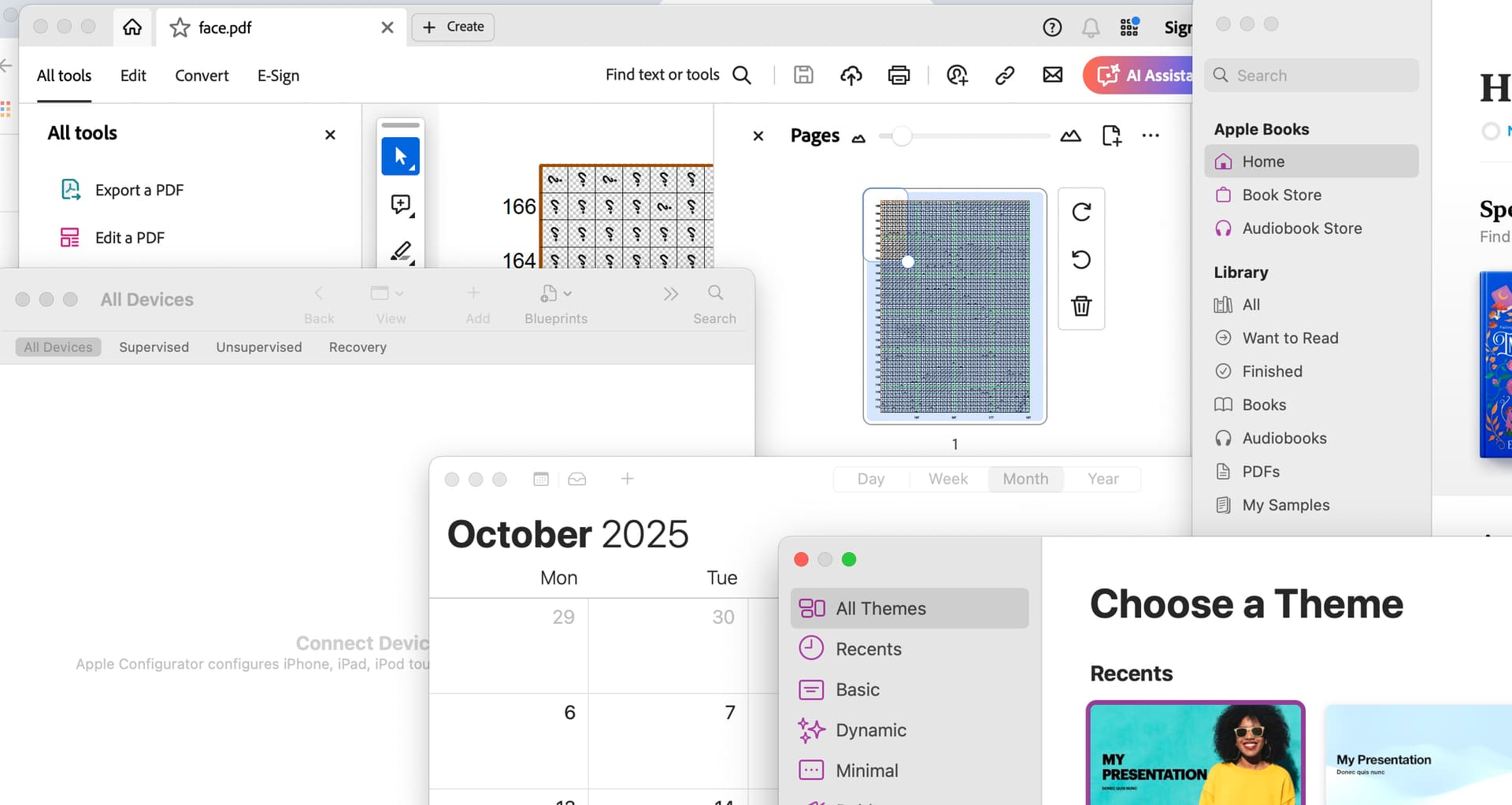
Apple has guidelines. And yet.. look at these apps.

And I didn’t even open Garageband..

No two the same (OK, one is from some startup called Adobe), but TBH I don’t mind.

1 Like

That’s the reason why I use system File Chooser with Java together. Makes it less complex aespecially on mac.

That is one of the problems you may get always when choosing the devleopment environment without thinking about the needed knowledge about UI.