Well to be honest, I used reference counting because it’s easier to implement and to explain, as well as to diagnose when things go wrong.
I still think we should try it. I’ll try to get some string manipulation methods in place in buoy so we can do some real world benchmarking.
Buoy does have an inherent advantage though. In Xojo, every method/event/code block gets wrapped in an exception handler so you can just handle exceptions at the bottom or in App.UnhandledException. That “feature” has a lot of overhead in every…single…method…
Yeah I get it; I’m a believer in minimizing cognitive burden. I think from a dev perspective a mature GC has fewer issues, if you don’t mind the nondeterminism it imposes on a few things. But it’s more of a large development team / Manhattan Project kind of thing to do right. If I were in your shoes I’m sure I’d feel the same way.
That seems slow.
I just tested that code on a 2019 Intel Macbook Pro and got 1.87 seconds during a debug run and 1.60 seconds when compiled. Running the compiled version on a M1 Mac Mini took 1.34 seconds.
One thing to remember is that Xojo automatically yields to other threads on a loop boundary which makes loops run slower. Adding a #pragma DisableBackgroundTasks dropped this down to 0.23 seconds debug and 0.15 seconds compiled on the Intel Macbook Pro and 0.12 seconds on the M1 Mac Mini.
Or that Buoy’s optimizer is smarter & realized that empty loop did nothing and completely dropped it
might need to actually put some manipulation in there that won’t be completely removed
Mother language, X or Buoy, uses GC so this shouldn’t be relevant at all
Add two more zeros. Buoy actually reports some time. Xojo… well I didn’t wait for it to finish.
Buoy 0.17.0 & 0.17.1
Lots of new and fixed items tonight
Between the two releases
New
- Added cross-platform Splitter control
- Added a sema-synthesized read-only property to control instances for referencing their ParentWindow so control definitions don’t need to carry that info with them.
- Application folder now has an icon on macOS
- Add Opening/Opened/Shown/Hidden/Activated/Deactivated lifecycle events sample and docs
Fixed
- Fixed an LSP regression that caused incorrect constructor errors
- Fixed a bug in the errors around numeric + string code
- Buoy version should stay consistent with the package now
- Fixed an bug in class destruction which caused only the most derived class to fire its destructor
- Fix a bug in the vscode plugin which caused properties without default values to be treated like blocks
- Connect GTK lifecycle signals only once
- Null lifecycle callbacks before DestroyWindow (teardown parity)
- Dedup Shown/Hidden so each visibility transition fires once on all platforms
- Null lifecycle callbacks before window destroy (teardown Hidden re-entry)
- Remove app hide/unhide observers on unregister/teardown (use-after-free)
Docs
- Tutorial updates for features added since last revisions
- Fixed a few notes about how things are implemented
- Warn that RaiseShown/RaiseHidden bypass the visibility dedup gate
- Add ScaleFactorChanged to Window docs
On that note, releases are going to slow down for a bit. Holiday weekend coming up and I want to actually go through the learning docs, proofread it and try everything out. Then I want to spend some time on the layout editor. I’m finding that I don’t actually like designing layouts completely in code, so I want to implement the constraint editor that I’ve been working on (I promise, no live updates while you’re editing, but I do want to try to have a quick way to view it). It’ll also give me a chance to exercise buoy a little and see what’s still missing for 1.0.
Buoy 0.19.0
Well it turns out that after I spent an hour working on the layout editor, I decided I really wanted a debugger. So here’s my July 4th surprise…
New Features
- VSCode Debugger. Load your project, press F5. it will look through your code to find the file that contains
main()and run it. Breakpoints, Stack Traces, Watches. - Cstring is now a real language type, fixing the free after use issue for char*
- Quoted-Path import so your projects can use folders for organization.
#import “controls/layoutCanvas” - Default hotkeys in VSCode. CMD-SHIFT-B = Build. CMD-SHIFT-R = Run
- Global qualifier to reach global items when you’ve shadowed them locally.
- Methods in a class no longer require
me.to call them.
Bug Fixes:
- VSCode builds now go into a folder named “Builds” next to the main project file
- VSCode: Methods without return types no longer show " as " without a type
// and /* */comments now have the correct coloring- Syntax colors for constructor calls are no longer offset by 4
- #if block contents are now indented
- Pasting in VSCode has been fixed
note: we found an issue with the new debugger run code that will make it darn near impossible to run a sample project from within the samples directory. You’ll need to copy it to a location by itself until we get that fixed.
The uploads are bad, only 134 byte each.
awesome. LFS grrrrrr
Fixed. Sorry about that.
I cannot even run your examples in this version

i do see there are some new settings in VSCode
I guess it might be because of lack of those ?
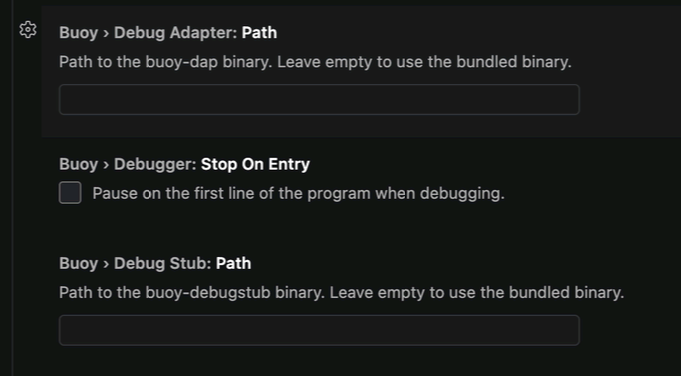
I am not sure what to set them to on default installation.
Only place it finds the dap file is at:

I don’t know if that’s where I should be pointing the settings to ? Seems like this path would change with every single new version if I was to link to that.
Thanks
Here’s what I suggest.
When you open the dmg, copy the folder direct to /Applications and replace the previous folder. Merging causes other problems because things are changing so fast. Finally, run the install_vs_extension.sh script in the buoy folder that you just copied. That will update the extension in VSCode.
In VSCode, the only preference you should need to set is the path to buoy, which will now be /Applications/Buoy/buoy.
Everything else is self contained in the plugin. At the moment it requires you to have Xcode installed because the public version of lldb has a bug on macOS that Apple seems to have worked around. That said Xcode 27.0b1 does not work. Xcode 26.5 works fine though. I’m confident we will get that solved, just not today.
Now here’s the kicker… as I mentioned on the release post, below the link, the debugger introduced a change and a bug that affects how the plugin finds the correct file to compile. When compiling, Buoy needs you to supply the file that contains main(), but that’s not always what you’ll have showing. When you run with CMD-SHIFT-R or F5, the plugin looks for a file in the directory recursively and uses the first one it finds. If you are in the examples folder, that’s going to do the wrong thing every time. We’re going to fix that path finding bug.
What’s not going to be “fixed” is probably the project structure issue. The plugin cant know where your main file will be. When you first open a project with the plugin, it. creates a .buoyfolder in the top level folder that you have showing. That folder contains a SQLite database with hints for the plugin for finding things and for autocomplete. It is updated as you create new things and it should be ignored by git. If you open the whole examples folder, it will attempt to make one there and the plugin may give you confusing cross-file results. Were are looking for a solution for this that doesn’t involve hiding these caches if at all possible.
I always delete the old folder. And then copy in, and never had problem before.
I am so confused what I am supposed to do, it fails just on your simple arrays.bui. It fails on everything. So basically is just one file like before and I only been hitting the run button.
I got it to run after several restarts and what not just now.
But there is still a problem that was not there before…(and might be why i could not run the first time)
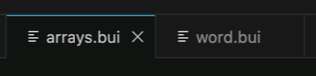
So I am now in arrays.bui → I hit run → and it runs arrays.bui.
Then I click word.bui → I hit run → it runs arrays.bui
This was not problem before that it seems to be random which tab it runs.
More investigation and testing then I find that to run word.bui (or any other bui file) then I need to switch tabs and reboot VS Code for it to run anything else than previous tab.
(Probably why I finally got it running on anything by rebooting earlier)
Are arrays and word in the same folder?
No, array is in your samples folder in the Application folder. While word is somewhere in my git folder.
I am guessing maybe then either or down the road then it should only be one buoy project per open workspace ?
Note also that the menu commands like debug and such dont work yet. I dont know if they were supposed to work. (until now I only been able to use the toolbar button and thats still the case)