No problem
I am just raising all flags that I hit so you end up with good product. It of course does not mean that everything needs to be done right away.
No problem
I am just raising all flags that I hit so you end up with good product. It of course does not mean that everything needs to be done right away.
Keep them coming. Currently we have a good assortment of bugs we need to look at.
anyone who’s been using the Buoy-built layout editor, please play around with the one in VSCode. Just above your Window block, there will be a link to open the editor.
It’s very basic at this point, but it does support locks. Please be patient with the UI. It’s very pre-alpha, but it should mostly work.
I was looking yesterday for the Build layout editor but could not find anything in the installed folder.
And is there some info on how to access the one in VSCode ?
One thought 'i had yesterday. Do we think having build button will be possible in VS code ? As in if you want to build instead of run. (and also to build other platforms then)
Look in the examples for window-block.bui
That shows the correct start config for a window. Once you have one of those, a little link appears before the block in the editor allowing you to show the editor.
Ultimately there will be some sort of build button and settings. Right now, you can press CMD-SHIFT-B to get a Mac build.
The more I learn about the capabilities of VSCode, the less interested I am in doing an IDE. That rudimentary layout editor took about 10 hours from concept to its current state, including a disabled editor for anchors which “works” but still has the ability to corrupt layouts. That was a fun AI journey in of itself. I described all the things that the Xojo and Xcode layout editors do that infuriate me and said DON’T DO THAT. Nearly two hours of churning and it still did, explaining to me that those things are inherently “just the way constraint editors behave”. We’re going to strive for better.
The editor opens.
How do I get back to code mode once I have opened the editor ?
And CMD Shift B worked to build, thanks.
When you open the layout editor it should be opening side-by-side with the code. You can even put them in two windows and see the layout editor make changes to the file.
Ah you are right, I somehow managed to miss that
Before anyone asks, ContainerControls are coming.
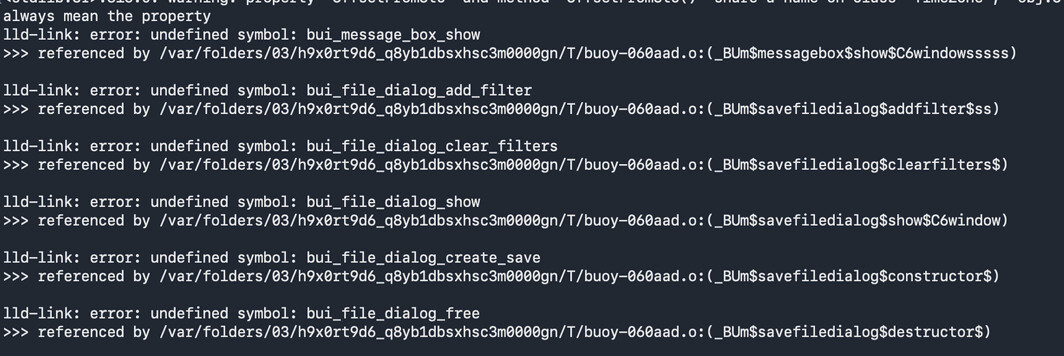
Ok so I am testing building Example App with my component for Windows for first time.
I am not sure what I am missing
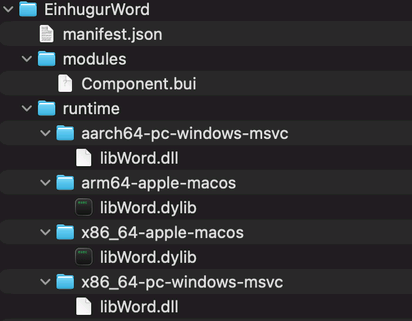
This here is the anatomy of my component before that one is packaged
I did see something in the documentation about lib and dll on Windows ? but I did not understand that part as for why or how. We think it has something to do with that ?
Ok so I managed to test my component by building Windows Console app instead. (which is fine as it is not UI Component’).
Component works fine so thats good. And buoy placed my dll side by the output thats good too.
It failed to place buoy_datetime.dll there. I had to manually fetch that one. I think that is a bug perhaps ?
(And maybe the UI test before failed just because it was not fetching the needed UI dlls ??)
And tried Linux test now:
bjorneiriksson@Mac-mini-M4 Example projects % buoy "A5ConsoleTest.bui" --target arm64-linux -o ConsoleTest
<stdlib:UI>:316:0: warning: property 'OffsetFromUtc' and method 'OffsetFromUtc()' share a name on class 'TimeZone'; 'obj.OffsetFromUtc' will always mean the property
ld.lld: error: cannot open /aarch64-unknown-linux-gnu/crt0.o: No such file or directory
bjorneiriksson@Mac-mini-M4 Example projects % ~
Got no clue what that one is about. Guessing some sort of bug in compiling for Linux arm64 maybe ?
Interesting bit is that even if it failed to complete the compile there then it did pull libbuoy_datetime.so in the Linux build (the part that it had failed to do in the Windows build)
If you look at the path, you see how it’s down in the .Buoy directory. That’s a cache, kinda like the Xojo plugins cache. Try deleting that hidden directory and try again, just in case it’s a caching issue.
I did not know what path to follow but I am getting the same problem on 3 Macs, so probably not Cache issue.
Always get this when attempting the Linux (arm64) build:
ld.lld: error: cannot open /aarch64-unknown-linux-gnu/crt0.o: No such file or directory
File individual bugs please
I’ve been focusing so much on Mac, I bet I didn’t write the directive of "if you find a window AND it’s Windows or Linux, build desktop apps there too. It was obvious for Mac because it requires a different format and extension.
Could you please add some discussion of multidimensional arrays to the Array documentation? Or are multidimensional arrays not yet available?
After creating a property as a 2D array with Var thearray As Array Of Array Of Integer, I’m finding that addressing elements as theArray(i)(j) leads to an unexpected ‘(‘ token error, while doing it as theArray(i, j) is interpreted as a missing function call.
Hoping to find a way around this, I tried declaring the 2D array as theArray(0)(0) As Integer and even theArray(0, 0) As Integer and got an error stating that this format does not work with properties.
I know this is going to sound cliché but…
Please file a bug report about being unable to address multidimensional arrays and the missing documentation thereof.
Now that we’re using AI for all of the triage work, it’s currently the best way to get it into our system.
Done!
If I put 2 or 3 dylibs into the buipkg then will it know which one to use based on what code the user uses ?
{
  "schema": 1,
  "name": "EinhugurRawBitmap",
  "version": "1.0.0",
  "description": "Einhugur RawBitmap Component for Buoy",
  "libraries": [{"libName": "RawBitmap", "system": false, "minVersion": "1.0.0"}]
}
So in this case for example, I assume I would put more records in the libraries array.
So if I had 3 modules in it and 3 libraries maybe…
And I only used something from one of the module would it then only compile in that module and the library that module called for ?
(I have not attempted to test this yet, I am just planning ahead, I don’t own 3 libraries yet to test the theory or plan)