maybe should start a category for Buoy in the forum
Codeless language modules aren’t terribly difficult, I wrote one for X that you could probably use as a starting point.
Done !
Thanks
Thank you Tim, you’re the best!
I saw the Buoy.plist in the buoy-issues page.
how do I install the the buoy into BBEdit??
looks like it’s
mkdir -p ~/Library/Application\ Support/BBEdit/Language\ Modules
and then put the plist in there and restart BBEdit
I already see the file there.
Restart BBEdit but where to select the language to use Buoy when opening BUI file?
It should be by file extension.
.bui
However I see that an early experiment with .bas snuck in. I’ll have to fix that at some point.
strange.. cannot get it to work.. I am using a demo version of BBEdit…
do you this might be the problem?
As mentioned @trishaduke, put the Buoy.plist file in the ~/Library/Application Support/BBEdit/Language Modules, then restart BBEdit.
If the editor doesn’t automatically preselect the Buoy syntax option by the file extension upon opening, you can manually change the language by selecting it in the footer of the BBEdit window.
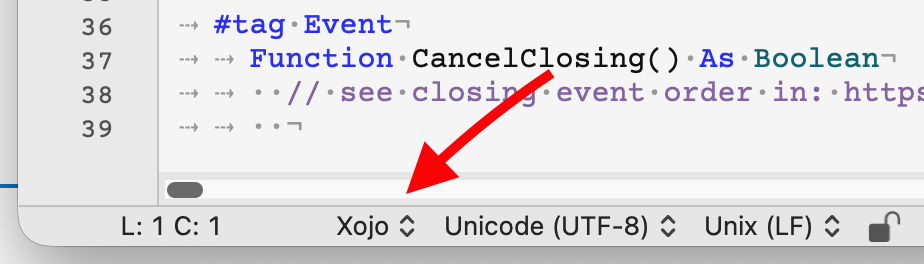
There is also an import feature for custom languages in BBEdit, under Settings > Languages > “Install Language Modules…”
But with all that said, for some reason the Buoy option is not appearing in my version of BBEdit. I got @Tim’s file to work on the first try, but not the Buoy file.
I think there might be a syntax or content error in the Buoy.plist file that BBEdit doesn’t like. I’m investigating…
As for a demo version of BBEdit, I think it should be fully functional until it expires, but I don’t really know for sure. Mine is a paid version.
I’m using the latest BBEdit 16.0.1 on macOS 26.5.1, iMac M3.
Edit: Can someone let me know if their Buoy.plist file worked?
BBEdit isn’t expired yet.. so should work
I am using BBEdit 16.0.1 on macOS 26.5.1, MacMini M4 Pro
the list of languages at the bottom does not include Buoy after restart
If you find something file a bug report and I’ll get that fixed.
Will do, when I have the spoons.
Strangely, if I remove the Buoy plist file and duplicate the Xojo one and rename it to Buoy.plist (plus change the internal code ID from Xojo to Buoy) - the duplicated file will work.
It’s something about the original Buoy file that BBEdit doesn’t like. I looked at both in a Hex editor, but can’t see anything different. Both are ASCII and both show the same byte codes for the beginning of the file.
what I did is get the xojo,plist from Tim, renamed to Buoy.plist, open with editor and adjust the name Xojo to Buoy and remove the xojo file extension and put in the BUI file extension.
go to BBEdit, go to Settings, Language and click on Install Language Module.
close Bbedit and Start again and it work!!!
probably need to remove some reserved word from the string list
by the way is there such thing as #if, #else, #elseif and #endif in Buoy?
I notice the original Buoy version has different “Language Features” from the Xojo copied one.
@andyb, strange how both of us are doing the same thing.. copy xojo version and adjust
It does. If it’s not in the supplied docs, it’s a bug.
I’ve got another release on the way to make it easier for me (and others) to add features. A sort of cross between plugins and libraries if you will. I’ll make sure the docs for #if are in there.
regarding this… in the downloaded bundle, look in
docs/documentation/conditional-compilation.md